Integrate Grafana with InfluxDB

Here in this article we will try to integrate Grafana OSS with InfluxDB to explore, analyze and visualze metrics data from a sample python application.
Test Environment
- Fedora 41 server
- Grafana v13.1.1
What is Grafana OSS
Grafana Open source software also know as Grafana OSS is a multi-platform open source analytics and interactive visualization web application. It provides charts, graphs, and alerts for the web when connected to supported data sources. It enables us to query, visualize, alert and explore the metrics, logs and traces from different sources.
Grafana OSS provides us with different tools and plugin framework for integration with different external datasources. Also it provides us with tools to turn the time-series database (TSDB) data into insightful graphs and visualizations.
What is InfluxDB
InfluxDB is an open-source time series database (TSDB) built by InfluxData to handle high-frequency, timestamped data with low latency.
If you are interested in watching the video. Here is the YouTube video on the same step by step procedure outlined below.
Procedure
Step1: Ensure Docker and Docker Compose installed
As a pre-requisite step ensure that docker and docker-compose is installed and running.
admin@linuxser:~$ docker --version
Docker version 28.5.2, build ecc6942

admin@linuxser:~$ docker compose version
Docker Compose version v5.1.0
Step2: Ensure Grafana and InfluxDB running
Here we are going to initialize the grafana and influxdb as docker container services with the below docker compose file.
admin@linuxser:~/grafana-influxdb$ cat docker-compose.yml
services:
  grafana:
    image: grafana/grafana:latest
    container_name: grafana
    environment:
      - GF_SERVER_DOMAIN=linuxser.stack.com
      - GF_SERVER_ROOT_URL=http://linuxser.stack.com:3000
    ports:
      - "3000:3000"
    volumes:
      # Mount persistent storage for your dashboards and data
      - grafana-storage:/var/lib/grafana
  influxdb:
    image: influxdb:latest
    container_name: influxdb
    ports:
      - "8086:8086"
    volumes:
      # Mount persistent storage for influxdb database
      - influxdb-storage:/var/lib/influxdb


volumes:
  grafana-storage:
  influxdb-storage:
Let’s now instantiate the services.
admin@linuxser:~/grafana-influxdb$ docker compose up -d
Validate both the services are up and running.
admin@linuxser:~/grafana-influxdb$ docker ps
CONTAINER ID   IMAGE                    COMMAND                  CREATED          STATUS          PORTS                                         NAMES
ae9f3eb62aa9   grafana/grafana:latest   "/run.sh"                12 seconds ago   Up 12 seconds   0.0.0.0:3000->3000/tcp, [::]:3000->3000/tcp   grafana
1f69183cc5a9   influxdb:latest          "/entrypoint.sh infl…"   12 seconds ago   Up 12 seconds   0.0.0.0:8086->8086/tcp, [::]:8086->8086/tcp   influxdb
InfluxDB: http://linuxser.stack.com:8086
Grafana: http://linuxser.stack.com:3000/
Step3: Create Python script
Here we are going to capture weather data from the National Weather Service (NWS) and store it in an InfluxDB time series database using a python Extract, Transform and Load (ie. ETL) script.
I am using the following sample python script for the same.
Ref: https://github.com/PacktPublishing/Learn-Grafana-10/blob/main/Chapter05/weather.py
admin@linuxser:~/grafana-influxdb$ cat requirements.txt
black==23.12.1; python_version >= '3.8'
certifi==2023.11.17; python_version >= '3.6'
charset-normalizer==3.3.2; python_full_version >= '3.7.0'
click==8.1.7; python_version >= '3.7'
idna==3.6; python_version >= '3.5'
mypy-extensions==1.0.0; python_version >= '3.5'
packaging==23.2; python_version >= '3.7'
pathspec==0.12.1; python_version >= '3.8'
platformdirs==4.1.0; python_version >= '3.8'
python-dateutil==2.8.2; python_version >= '2.7' and python_version not in '3.0, 3.1, 3.2, 3.3'
requests==2.31.0; python_version >= '3.7'
six==1.16.0; python_version >= '2.7' and python_version not in '3.0, 3.1, 3.2, 3.3'
urllib3==2.1.0; python_version >= '3.8'
admin@linuxser:~/grafana-influxdb$ cat weather.py
#!/usr/bin/python3

import argparse
import logging
import requests
import sys

from dateutil.parser import isoparse


def iso_to_timestamp(ts):
    return int(isoparse(ts).timestamp())


def get_station_obs(station):
    url = f"https://api.weather.gov/stations/{station}/observations"
    response = requests.get(url)
    logging.info(response.url)
    if response.status_code != requests.codes.ok:
        raise Exception(f"get_station_obs: {response.status_code}:{response.reason}")

    data = response.json()["features"]
    return data


def get_station_info(station):
    info = {}

    url = f"https://api.weather.gov/stations/{station}"
    response = requests.get(url)
    logging.info(response.url)
    if response.status_code != requests.codes.ok:
        raise Exception(f"get_station_info: {response.status_code}:{response.reason}")

    station_properties = response.json()["properties"]
    info["station_name"] = station_properties["name"].split(",")
    info["station_id"] = station_properties["stationIdentifier"]

    url = station_properties["county"]
    response = requests.get(url)
    logging.info(response.url)
    if response.status_code != requests.codes.ok:
        raise Exception(f"get_station_info: {response.status_code}:{response.reason}")

    county_properties = response.json()["properties"]
    info["county"] = county_properties["name"]
    info["state"] = county_properties["state"]
    info["cwa"] = county_properties["cwa"]
    info["timezone"] = county_properties["timeZone"]

    return info


def load_wx_data(db_host, db_port, db_name, token, input_file):
    if not db_name:
        raise Exception(f"load_wx_data: no database specified")

    url = f"http://{db_host}:{db_port}/write"
    headers = {"Authorization": f"Token {token}"}
    data = input_file.read()
    response = requests.post(
        url, params=dict(db=db_name, precision="s"), headers=headers, data=data
    )
    logging.info(response.url)
    if response.status_code != requests.codes.no_content:
        raise Exception(f"load_wx_data: {response.status_code}:{response.reason}")


def escape_string(string):
    return string.translate(string.maketrans({",": r"\,", " ": r"\ ", "=": r"\="}))


def dump_wx_data(stations, output):
    for s in stations.split(","):
        station_info = get_station_info(s)
        tags = [
            f'station={escape_string(station_info["station_id"])}',
            f'name={escape_string(",".join(station_info["station_name"]))}',
            f'cwa={escape_string(station_info["cwa"][0])}',
            f'county={escape_string(station_info["county"])}',
            f'state={escape_string(station_info["state"])}',
            f'tz={escape_string(station_info["timezone"][0])}',
        ]

        wx_data = get_station_obs(s)
        for feature in wx_data:
            for measure, observation in feature["properties"].items():
                if not isinstance(observation, dict) or measure in ["elevation"]:
                    continue

                value = observation["value"]
                if value is None:
                    continue

                unit = observation["unitCode"]

                timestamp = iso_to_timestamp(feature["properties"]["timestamp"])

                data = f'{measure},{",".join(tags)},unit={unit} value={value} {timestamp}\n'
                output.write(data)

    output.close()


def process_cli():
    parser = argparse.ArgumentParser(
        description="read forecast data from NWS into Influxdb"
    )
    group = parser.add_mutually_exclusive_group()

    parser.add_argument(
        "--host", dest="host", default="localhost", help="database host"
    )
    parser.add_argument(
        "--port", dest="port", type=int, default=8086, help="database port"
    )
    parser.add_argument(
        "--db", dest="database", help="name of database to store data in"
    )
    parser.add_argument(
        "--stations",
        dest="stations",
        help="list of stations to gather weather data from",
    )
    parser.add_argument("--token", dest="token", help="InfluxDB API token")
    group.add_argument(
        "--input", dest="input_file", type=argparse.FileType("r"), help="input file"
    )
    group.add_argument(
        "--output", dest="output_file", type=argparse.FileType("w"), help="output file"
    )
    return parser.parse_args()


def main():
    logging.basicConfig(level=logging.INFO)
    args = process_cli()

    if args.output_file:
        dump_wx_data(args.stations, args.output_file)

    if args.input_file:
        load_wx_data(
            db_host=args.host,
            db_port=args.port,
            db_name=args.database,
            token=args.token,
            input_file=args.input_file,
        )


if __name__ == "__main__":
    try:
        sys.exit(main())
    except Exception as err:
        logging.exception(err)
        sys.exit(1)
Validate the script by running to ensure that it is able to capture the weather data.
admin@linuxser:~/grafana-influxdb$ python weather.py --output wx.txt --stations KSFO,KDEN,KSTL,KJFK
INFO:root:https://api.weather.gov/stations/KSFO
INFO:root:https://api.weather.gov/zones/county/CAC081
INFO:root:https://api.weather.gov/stations/KSFO/observations
...
Here is the sample metrics data collected from the NWS endpoints.
admin@linuxser:~/grafana-influxdb$ cat wx.txt
temperature,station=KSFO,name=San\ Francisco\,\ San\ Francisco\ International\ Airport,cwa=MTR,county=San\ Mateo,state=CA,tz=America/Los_Angeles,unit=wmoUnit:degC value=26 1789017600
dewpoint,station=KSFO,name=San\ Francisco\,\ San\ Francisco\ International\ Airport,cwa=MTR,county=San\ Mateo,state=CA,tz=America/Los_Angeles,unit=wmoUnit:degC value=8 1789017600
barometricPressure,station=KSFO,name=San\ Francisco\,\ San\ Francisco\ International\ Airport,cwa=MTR,county=San\ Mateo,state=CA,tz=America/Los_Angeles,unit=wmoUnit:Pa value=101490.06 1789017600
...
Step4: Initialize InfluxDB
If this is the first time you are launching the influxdb portal, you will landing onto the following page.
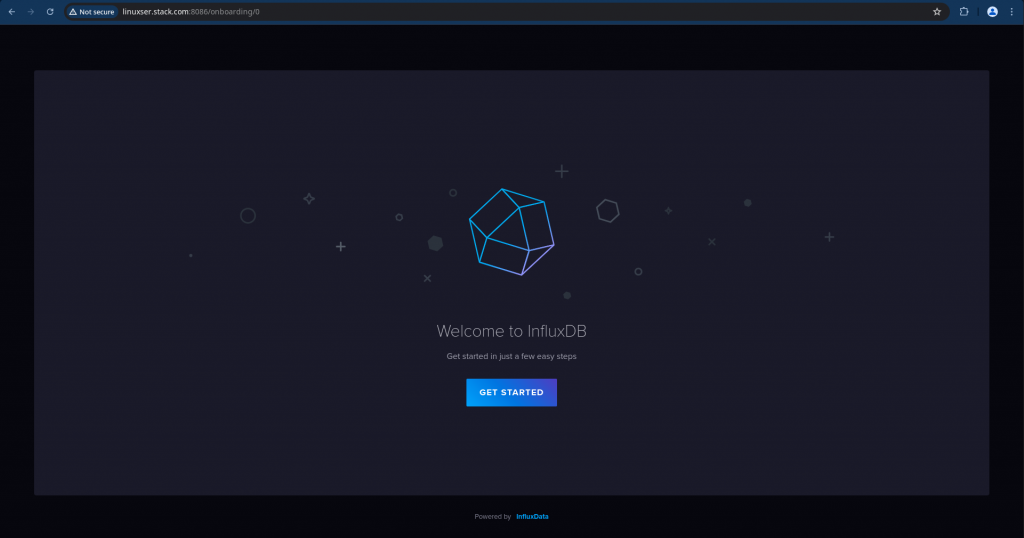
Click on Get Started and Create User
user: admin
password: admin@1234
initial_organization_name: grafanademo
initial_bucket_name: weatherdata
Once the user is created in the next page, you will be provided with the API token, copy it in a secure place for later use. This token enables superuser privileges like creating users, orgs, etc.
token: yBbqYpd2X0rcHx_J8wOTZLFJlFND4CVBdBx6McRc2DvmLK0Uxxxxxxxxxxxxxxxxxxxxxxxxxxxxxxxxxxxxxxxx
Step5: Load data into InfluxDB
Here we are going to use the influxdb write endpoint to bulk upload the weather metrics data into the influxdb database weatherdata as shown below.
admin@linuxser:~/grafana-influxdb$ python weather.py --input ./wx.txt --host linuxser.stack.com --port 8086 --db weatherdata --token yBbqYpd2X0rcHx_J8wOTZLFJlFND4CVBdBx6McRc2DvmLK0UuTnINXSico00yhP65oMRI-9mbc1i4y_N_-AbPg==
INFO:root:http://linuxser.stack.com:8086/write?db=weatherdata&precision=s
Step6: Configure Grafana datasource
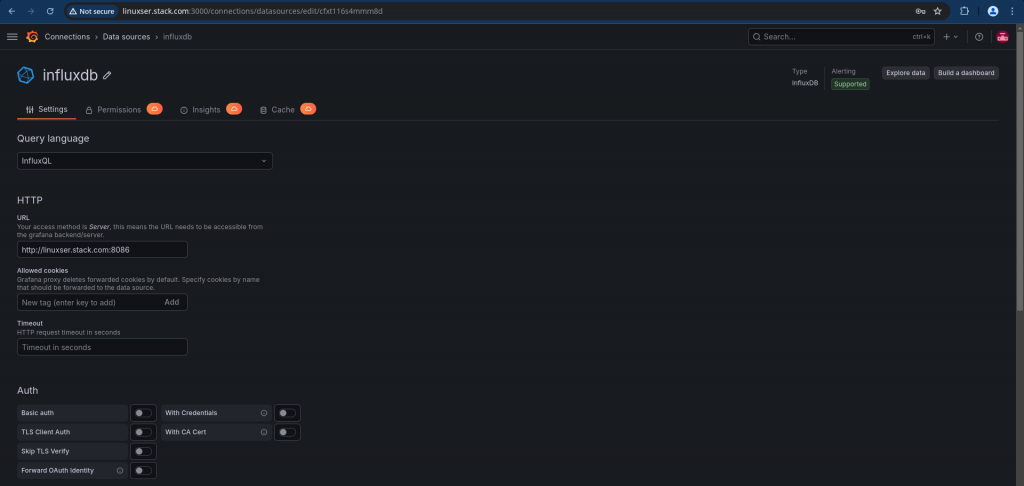
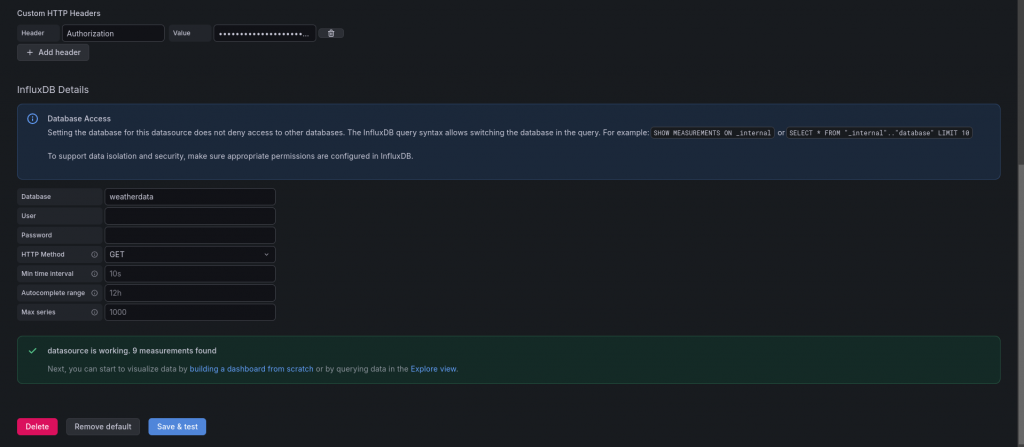
Here we are going to configure the new influxdb datasource in grafana portal. Here are the details of the configuration.
Please note, we are passing the token in the authorization header with value as “Token <API_Token_Value”.
Step7: Validate Data
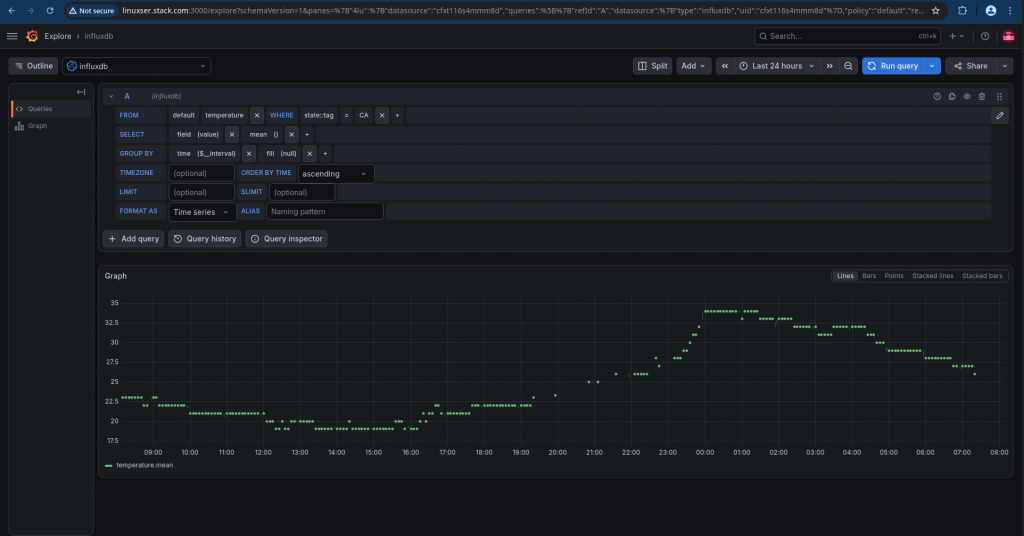
Now its time to explore our weather metrics data. We can do so using the explore and selecting the influxdb and select the measurement that we want to expolore and the station for which we want to get the data from.
Hope you enjoyed reading this article. Thank you..



Related Posts