Leverage Gunicorn wsgi server to deploy Python Flask application
Here in this article we will try to understand about Gunicorn wsgi server and leverage it to deploy a python flask application. We will further configure a reverse proxy server to act as a frontend to this wsgi server and server flask requests.
Test Environment
- Fedora 41 server
- Python v3.13.9
What is WSGI
WSGI is the Web Server Gateway Interface. It is a specification (PEP 3333) that describes how a web server communicates with web applications, and how web applications can be chained together to process one request.
A WSGI server (meaning WSGI compliant) only receives the request from the client, passes it to the application, and then sends the response returned by the application back to the client. It does nothing else. All the gory details must be supplied by the application or middleware.
WSGI applications (meaning WSGI-compliant applications) can be stacked. Those in the middle of the stack are called middleware and must implement both sides of the WSGI interface: application and server.
Gunicorn WSGI Server
Gunicorn is basically an implementation of the WSGI specification. It must be passed an application to run. The application’s interface is implemented as a callable such as a function, a method, a class, or an instance. That callable must:
Accept two positional parameters:
- A dictionary containing environment variables.
- A callback function used by the application to send the HTTP status code/message and HTTP headers to the server.
Return the response body to the server as an iterable of bytes.
Here is the complete request flow through a gunicorn wsgi server.
- Client send a request to the WSGI compliant application server.
- Gunicorn wsgi server parses the environ directory with the HTTP request header details.
- Gunicorn invokes the application by passing the environment and a callback start_response function.
- Python flask application processes the HTTP request and generates the status and headers as a part of response.
- Generated status and header information is passed to the callback function start_response.
- Flask applicaiton should then return a iterable of byte strings as body.
The WSGI server takes the status/headers from step 6, takes the body chunks from step 6, formats them into standard HTTP protocol text, and streams them over the network socket to the client.
High Level Architecture
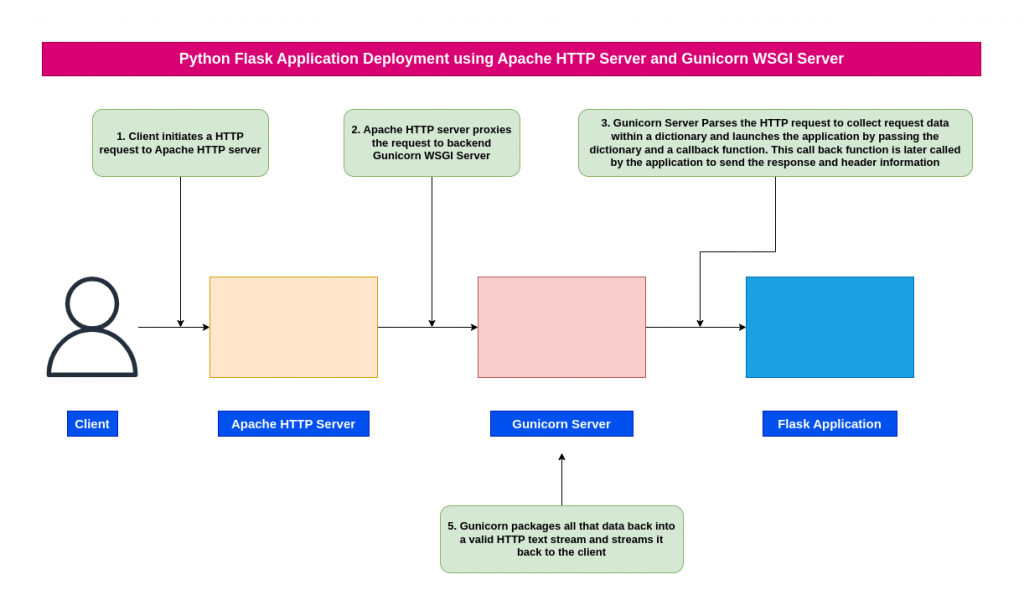
If you are interested in watching the video. Here is the YouTube video on the same step by step procedure outlined below.
Procedure
Step1: Ensure UV package manager installed
Here we are going to install uv which will be used to initialize a python application.
admin@linuxser:~$ sudo dnf install uv
Step2: Initialize Project using uv
Let’s now initialize a python applicaiton with package named “greet_web”.
admin@linuxser:~$ uv init --package greet_web --description "Greet Web Application"
Initialized project `greet-web` at `/home/admin/greet_web`

admin@linuxser:~$ cd greet_web/
admin@linuxser:~/greet_web$ tree .
.
├── pyproject.toml
├── README.md
└── src
    └── greet_web
        └── __init__.py
Step3: Install gunicorn and flask dependencies
Let’s now add the gunicorn and flask dependency to this project. Gunicorn is a WSGI compliant server used to talk to python application. Flask is a framework that we will use here to build a python web application.
admin@linuxser:~/greet_web$ uv add gunicorn
Using CPython 3.13.9 interpreter at: /usr/bin/python3.13
Creating virtual environment at: .venv
Resolved 2 packages in 2.39s
      Built greet-web @ file:///home/admin/greet_web
Prepared 2 packages in 69ms
Installed 2 packages in 5ms
 + greet-web==0.1.0 (from file:///home/admin/greet_web)
 + gunicorn==26.2.0

 admin@linuxser:~/greet_web$ uv add flask
Resolved 9 packages in 3.46s
      Built greet-web @ file:///home/admin/greet_web
Prepared 8 packages in 500ms
Uninstalled 1 package in 2ms
Installed 8 packages in 33ms
 + blinker==1.9.0
 + click==8.5.0
 + flask==3.1.3
 ~ greet-web==0.1.0 (from file:///home/admin/greet_web)
 + itsdangerous==2.2.0
 + jinja2==3.1.6
 + markupsafe==3.0.4
 + werkzeug==3.1.9
Step4: Update python initialization script
Now that we have our dependencies added, let’s update the below script. This script will act as a python flask application with a context “/greetweb”.
admin@linuxser:~/greet_web$ cat src/greet_web/__init__.py
from flask import Flask

app = Flask(__name__)

@app.route("/greetweb")
def main():
    return "Hello from greet-web!"
Step5: Run Python application
Now let’s launch the python flask application using the gunicorn. Here we are going to pass the flask application instance “src.greet_web:app” and make the backend application listen on “linuxser.stack.com:8000”.
admin@linuxser:~/greet_web$ uv run gunicorn --bind linuxser.stack.com:8000 --workers 2 "src.greet_web:app"
Step6: Validation Application
We can now validate the application by launching the below url.
URL: http://192.168.122.150:8000/greetweb
Until now we got our python flask application running in the backend with a WSGI compliant server in this case using gunicorn.
Let’s now go further and expose our backend application through a reverse proxy server such as Apache HTTP server.
Step7: Install Apache httpd
Here we are going to install the Apache HTTP server which will act as a reverse proxy server for our backend gunicorn hosted python flask application.
admin@linuxser:~/greet_web$ sudo dnf install httpd
Step8: Update Apache httpd config
Now let’s create a “wsgi.conf” file with the following configuration. Ensure that you got the proxy and header modules loaded within your appche HTTP server.
The location directive that we defined here will take any requests on “/greetweb” and proxy them to backend gunicorn server hosted on “127.0.0.1:8000” as shown below.
admin@linuxser:/etc/httpd/conf.d$ cat wsgi.conf
# Enable Proxy and Header modules in your main server config
# LoadModule proxy_module modules/mod_proxy.so
# LoadModule proxy_http_module modules/mod_proxy_http.so
# LoadModule headers_module modules/mod_headers.so

<Location /greetweb>
	ProxyPass http://127.0.0.1:8000/greetweb
	RequestHeader set X-Forwarded-Proto http
	RequestHeader set X-Forwarded-Prefix /greetweb
</Location>
Once the necessary config updates are done, Let’s restart the apache http server for the changes to take effect.
admin@linuxser:~/greet_web$ sudo systemctl restart httpd.service
Step9: Serve Flask application using Proxy
Now, let’s start our stop and start our python flask application using gunicorn by binding it to “127.0.0.1:8000” as shown below.
admin@linuxser:~/greet_web$ uv run gunicorn --bind 127.0.0.1:8000 --workers 2 "src.greet_web:app"
We should now be able to access our python flask using through the reverse proxy server listening on port “80”.
admin@linuxser:~$ curl http://linuxser.stack.com/greetweb

Hope you enjoyed reading this article. Thank you..



Related Posts