How to secure Docker runtime with Open Policy Agent policy
Here in this article we will try to secure Docker runtime environment using the Open Policy agent policy. This policy would prevents users from running insecure containers.
Test Environment
- Fedora 41 server
- Docker
- OPA
What is Open Policy Agent (OPA)
The Open Policy Agent (OPA, pronounced “oh-pa”) is an open source, general-purpose policy engine that unifies policy enforcement across the stack. OPA provides a high-level declarative language that lets you specify policy as code and simple APIs to offload policy decision-making from your software. You can use OPA to enforce policies in microservices, Kubernetes, CI/CD pipelines, API gateways, and more.
What is OPA Docker Authorization Plugin
The opa-docker-authz project is an authorization plugin for the Docker Engine that uses the Open Policy Agent (OPA) to provide fine-grained, policy-based access control over Docker commands.
High Level Architecture
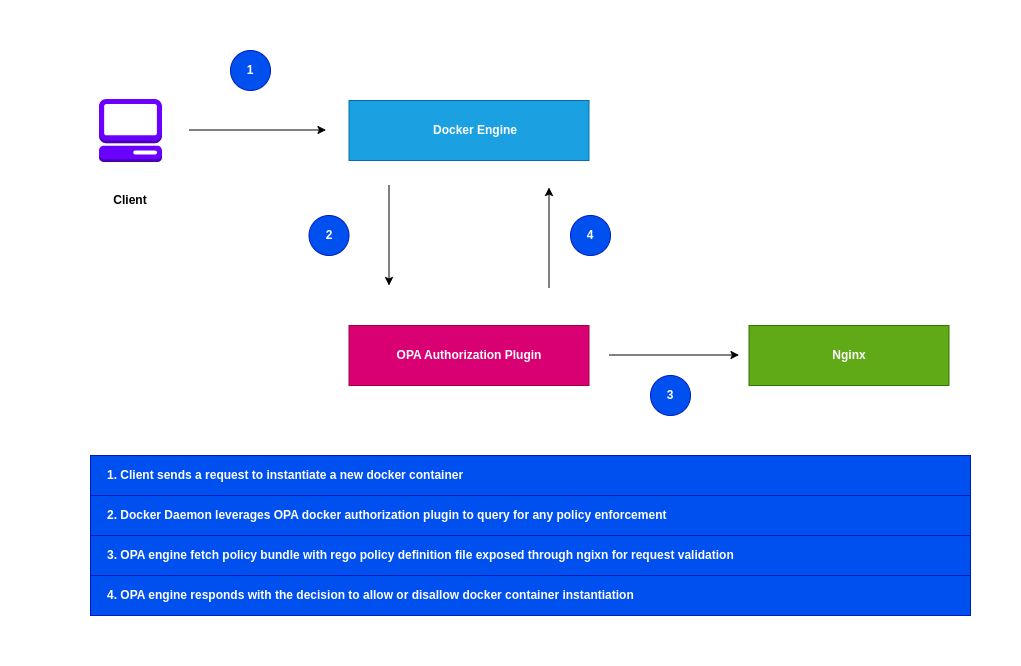
If you are interested in watching the video. Here is the YouTube video on the same step by step procedure outlined below.
Procedure
Step1: Ensure Docker installed and running
As a first step ensure that you have docker installed and running on the system. Follow official docker documentation pages to install the same.
Ensure that the docker daemon service is up and running.
admin@linuxscratch:~$ sudo systemctl start docker.service
admin@linuxscratch:~$ sudo systemctl status docker.service
Step2: Download and Install OPA binary
Here we are going to download and install the OPA cli binary into “/usr/local/bin/”.
admin@linuxscratch:~$ curl -L -o opa https://openpolicyagent.org/downloads/latest/opa_linux_amd64
admin@linuxscratch:~$ chmod 755 opa
admin@linuxscratch:~$ sudo mv opa /usr/local/bin/

admin@linuxscratch:~$ opa version
Version: 1.13.1
Build Commit: 9c3bb906f1ac56903e2754982d66c83f9a9aaa06-dirty
Build Timestamp: 2026-01-29T20:39:56Z
Build Hostname:
Go Version: go1.25.6
Platform: linux/amd64
Rego Version: v1
WebAssembly: available
Step3: Ensure Nginx installed and running
For demo purpose, we are going to install nginx http server on the same machine as docker daemon. This nginx server will be used to serve the opa policy bundle which we will prepare in the later steps.
admin@linuxscratch:~$ sudo dnf install nginx

admin@linuxscratch:~$ sudo systemctl start nginx.service
admin@linuxscratch:~$ sudo systemctl status nginx.service
Optional, update to your firewall rules is required if you are trying to access the nginx server from a remote host.
admin@linuxscratch:~$ sudo firewall-cmd --add-port=80/tcp --permanent
success
admin@linuxscratch:~$ sudo firewall-cmd --reload
success
Step4: Create a OPA policy definition
Here we are going to define OPA policy “authz.rego” with a single rule named allow that always produces the decision true.
admin@linuxscratch:~$ mkdir docker_opa_demo
admin@linuxscratch:~$ cd docker_opa_demo/
admin@linuxscratch:~/docker_opa_demo$ cat authz.rego
package docker.authz

allow := true
Step4: Create OPA policy bundle
Let’s now bundle the OPA rego policy definition file in compressed gzip format and place it the default nginx document root “/usr/share/nginx/html”.
admin@linuxscratch:~/docker_opa_demo$ sudo opa build --bundle --output /usr/share/nginx/html/bundle.tar.gz .
The purpose of this step is to serve our OPA policy bundle through Nginx HTTP server.
Step5: Create OPA config file
Here we are going to create a custom configuration file for the OPA policy agent which will provide information about authorization service endpoint and the policy bundle resource that will be used for policy enforcement.
All of the policy decision will be logged to the docker logs console with this configuration.
admin@linuxscratch:~$ sudo mkdir -p /etc/docker/config
admin@linuxscratch:~$ cat /etc/docker/config/opa-config.yaml
services:
  authz:
    url: http://localhost

bundles:
  authz:
    service: authz
    resource: bundle.tar.gz

# Optional - Print decisions in the Docker logs. Configure a remote service for production use cases.
decision_logs:
  console: true
Step6: Install the opa-docker-authz plugin
Here is a important step, wherein we are going to install the “opa-docker-authz” docker plugin and pass the custom config file that we created in last step.
admin@linuxscratch:~$ docker plugin install --alias opa-docker-authz ghcr.io/open-policy-agent/opa-docker-authz:v0.10 opa-args="-config-file /opa/config/opa-config.yaml"
Plugin "ghcr.io/open-policy-agent/opa-docker-authz:v0.10" is requesting the following privileges:
 - network: [host]
 - mount: [/etc/docker]
Do you grant the above permissions? [y/N] y
v0.10: Pulling from ghcr.io/open-policy-agent/opa-docker-authz
Digest: sha256:d7f7ddcadb10bf28b450370fc9ba6751e85b9c383c43c061bc38382ef251b50c
36b0662fcc7f: Complete
Installed plugin ghcr.io/open-policy-agent/opa-docker-authz:v0.10
Let’s list the installed plugin and check if its enabled.
admin@linuxscratch:~/docker_opa_demo$ docker plugin ls
ID             NAME                      DESCRIPTION                                     ENABLED
f23a041b7e83   opa-docker-authz:latest   A policy-enabled authorization plugin for Do…   true
Now we need to configure the docker daemon to use the plugin for authorization. We need to provide the OPA authorization plugin name as shown below.
admin@linuxscratch:~$ sudo cat /etc/docker/daemon.json
{
  "authorization-plugins": ["opa-docker-authz"]
}
Reload docker daemon with updated configuration. You can as well restart the docker service.
admin@linuxscratch:~$ sudo kill -HUP $(pidof dockerd)
If everything is correctly setup, you should still be able to list the containers without any problem. But the docker daemon logs will show how it leverage the OPA policy before allowing the access.
admin@linuxscratch:~$ docker ps
Try to check the docker service logs to ensure that OPA policy agent enforcement is in place.
admin@linuxscratch:~$ journalctl -fu docker.service

Feb 13 15:18:30 linuxscratch.stack.com dockerd[118238]: time="2026-02-13T15:18:30+05:30" level=error msg="{\"bundles\":{\"authz\":{}},\"decision_id\":\"f9ab5ddc-285c-4083-91e0-3a689faf1f2a\",\"input\":{\"AuthMethod\":\"\",\"BindMounts\":null,\"Body\":{},\"Headers\":{\"User-Agent\":\"Docker-Client/28.4.0 (linux)\"},\"Method\":\"GET\",\"Path\":\"/v1.51/containers/json\",\"PathArr\":[\"\",\"v1.51\",\"containers\",\"json\"],\"PathPlain\":\"/v1.51/containers/json\",\"Query\":{},\"User\":\"\"},\"labels\":{\"id\":\"4e11bc31-0ac1-4b28-ae7c-a1da11724522\",\"version\":\"1.3.0\"},\"level\":\"info\",\"metrics\":{\"timer_rego_query_eval_ns\":29979,\"timer_sdk_decision_eval_ns\":127557},\"msg\":\"Decision Log\",\"nd_builtin_cache\":null,\"path\":\"/docker/authz/allow\",\"result\":true,\"time\":\"2026-02-13T09:48:30Z\",\"timestamp\":\"2026-02-13T09:48:30.757731633Z\",\"type\":\"openpolicyagent.org/decision_logs\"}" plugin=f23a041b7e839fe077c907dc351b1cf14416d3ef6840679b787518d3883ac3d6
Step7: Update OPA policy to disallow privileged containers
Here we are going to update our OPA rego policy to deny running any containers with “privileged” flag set to “true”
admin@linuxscratch:~/docker_opa_demo$ cat authz.rego
package docker.authz

default allow := false

allow if {
	not deny
}

deny if {
	priv_containers
}

priv_containers if {
  input.Body.HostConfig.Privileged == true
}
Now let’s re-bundle updated policy file and push it to the nginx server as shown below. Restart the docker service for the changes to take effect.
admin@linuxscratch:~/docker_opa_demo$ sudo opa build --bundle --output /usr/share/nginx/html/bundle.tar.gz .
admin@linuxscratch:~/docker_opa_demo$ sudo systemctl restart docker.service
Step8: Validate OPA Policy enforcement
Now its time to spin up a httpd container as shown below. The OPA policy will allow the following container to be instantiated as its not having “privileged” flag set to “true”.
admin@linuxscratch:~/docker_opa_demo$ docker run -d -p 8080:80 httpd:latest
Now, if we try to launch the same container with “privileged” flag set to “true”, you will get a “authorization denied by plugin” error as shown below.
admin@linuxscratch:~/docker_opa_demo$ docker run --privileged -d -p 8080:80 httpd:latest
docker: Error response from daemon: authorization denied by plugin opa-docker-authz:latest: request rejected by administrative policy
Hope you enjoyed reading this article. Thank you..


Related Posts