How to integration Grafana with OpenLDAP for Authc and Authz

Here in this article we will try to configure Grafana to authenticate and authorize using the OpenLDAP identify provider.
Test Environment
- Fedora 41 server
- Grafana v13.1.1
High Level Architecture
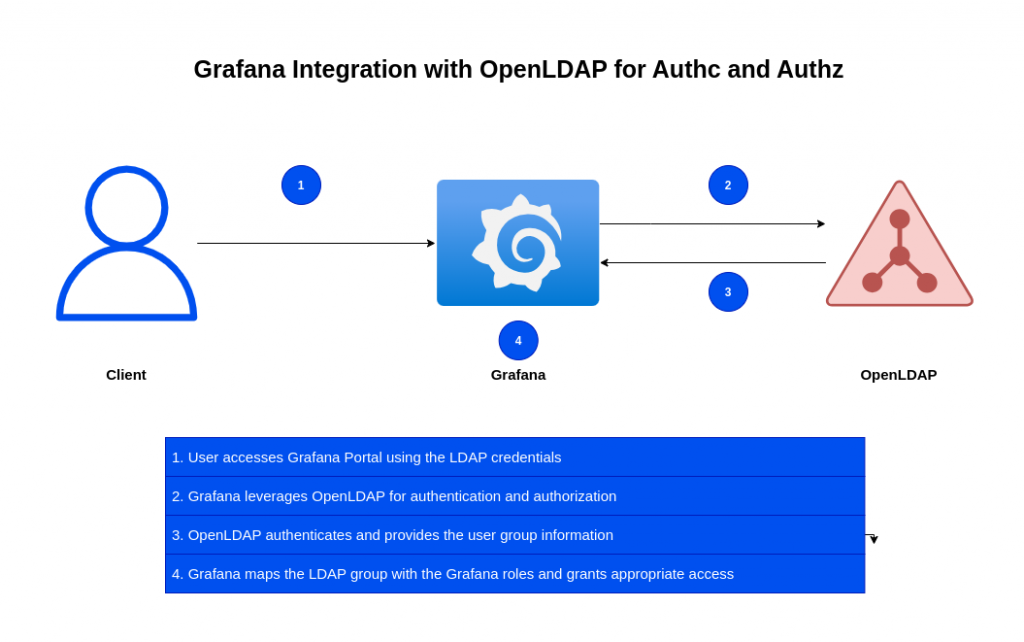
If you are interested in watching the video. Here is the YouTube video on the same step by step procedure outlined below.
Procedure
Step1: Ensure Grafana installed and running
As a first step ensure that you have a running instance of grafana on your local machine. You can follow “How to secure Grafana using SSL certificate” for the same.
Step2: Ensure OpenLDAP service running
We need to clone the openldap repository and build the docker image as shown below.
admin@linuxser:~/openldapbuild$ git clone https://github.com/bitnami/containers.git
admin@linuxser:~/openldapbuild$ cd containers/bitnami/openldap/2.6/debian-12
admin@linuxser:~/openldapbuild/containers/bitnami/openldap/2.6/debian-12$ docker build -t bitnami/openldap:2 .
Below is the custom LDAP directory structure LDIF file that we will be using to setup LDAP domain, groups and users for this demo.
As you can see there are two types of users
- “nxdev1” and “nxdev2” part of “Developers” group
- “nxadmin1” user part of “Administrator” group
admin@linuxser:~/openldap$ cat ldifs/custom.ldif
dn: dc=stack,dc=com
objectClass: top
objectClass: domain
dc: stack

dn: ou=groups,dc=stack,dc=com
objectClass: organizationalUnit
objectClass: top
ou: groups

dn: ou=users,dc=stack,dc=com
objectClass: organizationalUnit
objectClass: top
ou: users

dn: cn=nxdev1,ou=users,dc=stack,dc=com
objectClass: person
objectClass: inetOrgPerson
objectClass: organizationalPerson
objectClass: top
cn: nxdev1
sn: nxdev1
givenName: nxdev1
mail: nxdev1@stack.com
uid: 1001
userPassword: nxdev1

dn: cn=nxdev2,ou=users,dc=stack,dc=com
objectClass: person
objectClass: inetOrgPerson
objectClass: organizationalPerson
objectClass: top
cn: nxdev2
sn: nxdev2
givenName: nxdev2
mail: nxdev2@stack.com
uid: 1002
userPassword: nxdev2

dn: cn=nxadmin1,ou=users,dc=stack,dc=com
objectClass: person
objectClass: inetOrgPerson
objectClass: organizationalPerson
objectClass: top
cn: nxadmin1
sn: nxadmin1
givenName: nxadmin1
mail: nxadmin1@stack.com
uid: 1003
userPassword: nxadmin1

dn: cn=Administrator,ou=groups,dc=stack,dc=com
objectClass: groupOfNames
objectClass: top
cn: Administrator
member: cn=nxadmin1,ou=users,dc=stack,dc=com

dn: cn=Developers,ou=groups,dc=stack,dc=com
objectClass: groupOfNames
objectClass: top
cn: Developers
member: cn=nxdev1,ou=users,dc=stack,dc=com
member: cn=nxdev2,ou=users,dc=stack,dc=com
Here is the docker compose file to setup OpenLDAP service.
admin@linuxser:~/openldap$ cat docker-compose.yml
services:
  openldap:
    image: bitnami/openldap:2
    container_name: openldap
    ports:
      - '1389:1389'
      - '1636:1636'
    environment:
      - LDAP_ADMIN_USERNAME=admin
      - LDAP_ADMIN_PASSWORD=admin@1234
      #- LDAP_USERS=devuser1,devuser2
      #- LDAP_PASSWORDS=devuser1,devuser2
      - LDAP_ROOT=dc=stack,dc=com
      - LDAP_ADMIN_DN=cn=admin,dc=stack,dc=com
      - LDAP_CUSTOM_LDIF_DIR=/ldifs         # Configuring LDAP to use custom LDIF file
    networks:
      - openldap-net
    volumes:
      - 'openldap-data:/bitnami/openldap'
      - './ldifs:/ldifs'                    # Custom LDIF file directory loaded from host to container

volumes:
  openldap-data:

networks:
  openldap-net:
Let’s now instantiate the OpenLDAP service.
admin@linuxser:~/openldap$ docker compose up -d
Once the OpenLDAP services is running we can validate LDAP DIT tree structure using the below command.
admin@linuxser:~/opensearch_with_openldap$ ldapsearch -H ldap://linuxser.stack.com:1389 -x -b 'dc=stack,dc=com' -D 'cn=admin,dc=stack,dc=com' '(objectClass=*)' -W
NOTE: Install openldap-clients package for ldap client tools installation
Step3: Configure Grafana with OpenLDAP
Here in this step we will try to configure grafana with OpenLDAP for user authentication and authorization.
Grafana uses a third-party LDAP library under the hood that supports basic LDAP v3 functionality. It supports any compliant LDAPv3 server such as OpenLDAP or Active Directory among others.
First we need to enable the ldap configuration in the grafana.ini file. Here we are updating the logging level to debug for the ldap logs and referring to the “/etc/grafana/ldap.toml” ldap configuration file.
Also we are setting “allow_sign_up” to true, so that any LDAP authenticated user is created in the grafana as a user and “skip_org_role_sync” to false to ensure that the LDAP groups are mapped to roles within Grafana.
admin@linuxser:/etc/grafana$ cat grafana.ini
...
[log]
level = debug
filters = ldap.debug

[auth.ldap]
enabled = true
config_file = /etc/grafana/ldap.toml
allow_sign_up = true
skip_org_role_sync = false
...
NOTE: If you get the below error “Skipping organization role mapping”, you may have missed to set “skip_org_role_sync” to false in grafana.ini file.
logger=ldap t=2026-08-22T21:28:11.292515265+02:00 level=info msg="Searching for user's groups" filter="(&(objectClass=groupOfNames)(member=cn=nxadmin1,ou=users,dc=stack,dc=com))"
logger=ldap t=2026-08-22T21:28:11.295024993+02:00 level=debug msg="Skipping organization role mapping."
logger=ldap t=2026-08-22T21:28:11.295240742+02:00 level=debug msg="LDAP users found" users="[OAuthToken: <nil>, AuthModule: ldap, AuthId: cn=nxadmin1,ou=users,dc=stack,dc=com, UserId: 0, Email: nxadmin1@stack.com, Login: nxadmin1, Name: nxadmin1 nxadmin1, Groups: [cn=Administrator,ou=groups,dc=stack,dc=com], OrgRoles: map[], IsGrafanaAdmin: nil, IsDisabled: false, SkipTeamSync: false]"
admin@linuxser:/etc/grafana$ sudo grep -v "^#" ldap.toml
verbose_logging = true

[[servers]]
host = "127.0.0.1"
port = 1389
use_ssl = false
start_tls = false
tls_ciphers = []
min_tls_version = ""
ssl_skip_verify = true

bind_dn = "cn=admin,dc=stack,dc=com"
bind_password = 'admin@1234'

timeout = 10

search_filter = "(cn=%s)"

search_base_dns = ["dc=stack,dc=com"]

group_search_filter = "(&(objectClass=groupOfNames)(member=cn=%s,ou=users,dc=stack,dc=com))"
group_search_base_dns = ["ou=groups,dc=stack,dc=com"]
group_search_filter_user_attribute = "cn"

[servers.attributes]
name = "givenName"
surname = "sn"
username = "cn"
email =  "mail"

[[servers.group_mappings]]
group_dn = "cn=Administrator,ou=groups,dc=stack,dc=com"
org_role = "Admin"
grafana_admin = true

[[servers.group_mappings]]
group_dn = "cn=Developers,ou=groups,dc=stack,dc=com"
org_role = "Editor"

[[servers.group_mappings]]
group_dn = "*"
org_role = "Viewer"
Step4: Restart Grafana service
Now that the configuration is updated, let’s restart the grafana service for the changes to take effect.
admin@linuxser:~$ sudo systemctl stop grafana-server.service
admin@linuxser:~$ sudo systemctl start grafana-server.service
Step5: Validate LDAP authentication
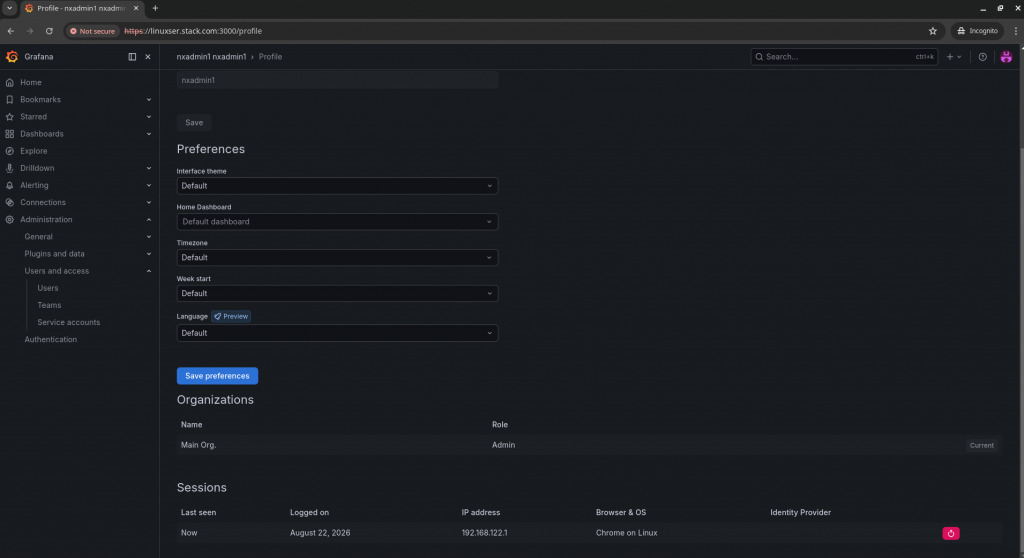
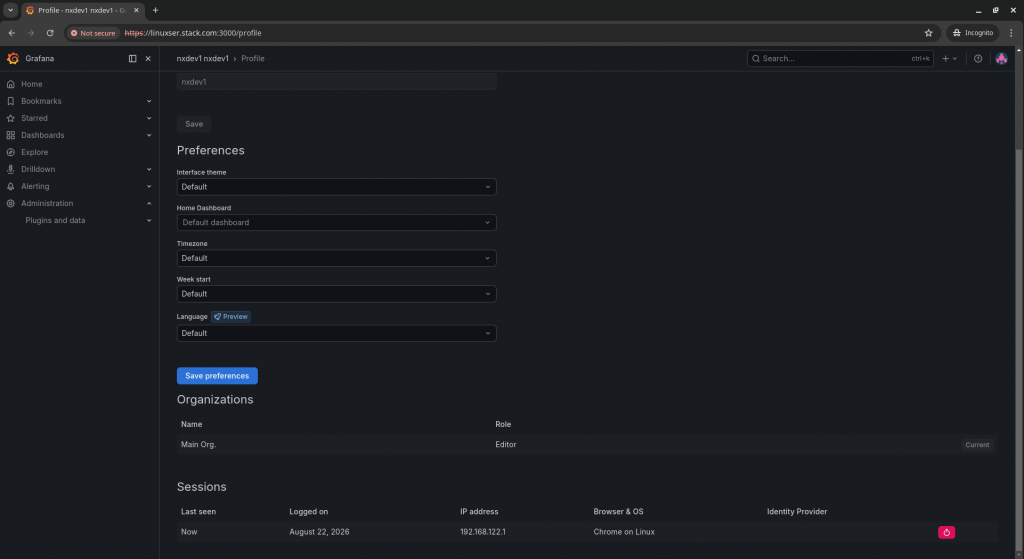
It’s time to authenticate with the LDAP users and ensure that correct organization roles are getting mapped to repective users.
user: nxadmin1
user: nxdev1
As we have enabled the debug logging, we can also validate the logs for both users as shown below.
logger=ldap t=2026-08-22T21:32:10.469068149+02:00 level=debug msg="LDAP SearchRequest" searchRequest="&{BaseDN:dc=stack,dc=com Scope:2 DerefAliases:0 SizeLimit:0 TimeLimit:0 TypesOnly:false Filter:(|(cn=nxadmin1)) Attributes:[cn sn mail givenName cn] Controls:[]}\n"
logger=ldap t=2026-08-22T21:32:10.473311078+02:00 level=info msg="Searching for user's groups" filter="(&(objectClass=groupOfNames)(member=cn=nxadmin1,ou=users,dc=stack,dc=com))"
logger=ldap t=2026-08-22T21:32:10.476524857+02:00 level=debug msg="LDAP users found" users="[OAuthToken: <nil>, AuthModule: ldap, AuthId: cn=nxadmin1,ou=users,dc=stack,dc=com, UserId: 0, Email: nxadmin1@stack.com, Login: nxadmin1, Name: nxadmin1 nxadmin1, Groups: [cn=Administrator,ou=groups,dc=stack,dc=com], OrgRoles: map[1:Admin], IsGrafanaAdmin: true, IsDisabled: false, SkipTeamSync: false]"
logger=ldap t=2026-08-22T21:32:38.9106077+02:00 level=debug msg="LDAP SearchRequest" searchRequest="&{BaseDN:dc=stack,dc=com Scope:2 DerefAliases:0 SizeLimit:0 TimeLimit:0 TypesOnly:false Filter:(|(cn=nxdev1)) Attributes:[cn sn mail givenName cn] Controls:[]}\n"
logger=ldap t=2026-08-22T21:32:38.913454568+02:00 level=info msg="Searching for user's groups" filter="(&(objectClass=groupOfNames)(member=cn=nxdev1,ou=users,dc=stack,dc=com))"
logger=ldap t=2026-08-22T21:32:38.916170815+02:00 level=debug msg="LDAP users found" users="[OAuthToken: <nil>, AuthModule: ldap, AuthId: cn=nxdev1,ou=users,dc=stack,dc=com, UserId: 0, Email: nxdev1@stack.com, Login: nxdev1, Name: nxdev1 nxdev1, Groups: [cn=Developers,ou=groups,dc=stack,dc=com], OrgRoles: map[1:Editor], IsGrafanaAdmin: false, IsDisabled: false, SkipTeamSync: false]"
Hope you enjoyed reading this article. Thank you..



Related Posts