How to setup Nexus OSS repository with Postgres database on Fedora
Here in this article we will try to setup Nexus OSS repository on Fedora OS with Postgres database as the backend for metadata storage.
Test Environment
- Fedora 41 server
- Nexus 3.91.1
- Postgres 16.11
What is Nexus OSS
Sonatype Nexus Repository Community Edition is the perfect solution to help individual developers and small teams manage their components effectively for free. It supports up to 40,000 total components and 100,000 requests per day. Also it provides current usage statistics (component count, requests per min/day) on their home screens after logging into the instance.
If you are interested in watching the video. Here is the YouTube video on the same step by step procedure outlined below.
Procedure
Step1: Download and Extract Nexus OSS archive
As a first we will download the nexus oss archive package and extract it as shown below. This will extract two directories.
- Nexus Application Directory: nexus-3.91.1-04
- Nexus Data Directory: sonatype-work
admin@linuxser:~$ wget https://download.sonatype.com/nexus/3/nexus-3.91.1-04-linux-x86_64.tar.gz
admin@linuxser:~$ tar -xvzf nexus-3.91.1-04-linux-x86_64.tar.gz

admin@linuxser:~$ ls -ld nexus-3.91.1-04 sonatype-work
drwxr-xr-x. 1 admin admin 80 Apr 28 14:19 nexus-3.91.1-04
drwxr-xr-x. 1 admin admin 12 Apr 17 21:47 sonatype-work
Step2: Install and Start Postgres SQL service
In this step will install and initialize the postgres database service.
admin@linuxser:~$ sudo dnf install postgresql-server postgresql-contrib

admin@linuxser:~$ sudo postgresql-setup --initdb
 * Initializing database in '/var/lib/pgsql/data'
 * Initialized, logs are in /var/lib/pgsql/initdb_postgresql.log

admin@linuxser:~$ sudo systemctl enable postgresql.service
admin@linuxser:~$ sudo systemctl start postgresql.service
Step3: Create Nexus Database and User
Once the postgres service is up and running, we can connect to the database using the “postgres” database user. First let’s switch to the “postgres” user and connect to the postgres database using the psql client tool as shown below.
Now, we can create a “nexus” user with a password, “nexus” database and grant all privileges to the “nexus” user onto the database “nexus”. We are also creating a schema named “nexus” in the “nexus” database which will be used by the nexus application.
admin@linuxser:~$ sudo su - postgres
postgres@linuxser:~$ psql
psql (16.11)
Type "help" for help.

postgres=# CREATE USER nexus WITH PASSWORD 'nexus@1234';
CREATE ROLE

postgres=# CREATE DATABASE nexus OWNER nexus ENCODING 'UTF8' LC_COLLATE = 'en_US.UTF-8' LC_CTYPE = 'en_US.UTF-8' TEMPLATE template0;
CREATE DATABASE
postgres=# \c nexus;
You are now connected to database "nexus" as user "postgres".

nexus=# CREATE SCHEMA nexus;
CREATE SCHEMA

nexus=# GRANT ALL PRIVILEGES ON DATABASE nexus TO nexus;
GRANT
nexus=# GRANT ALL PRIVILEGES ON SCHEMA nexus TO nexus;
GRANT
We need to update pg_hba.conf to allow for localhost connection with md5 authentication method.
root@linuxser:/var/lib/pgsql/data# cat pg_hba.conf
...
# TYPE  DATABASE        USER            ADDRESS                 METHOD

# "local" is for Unix domain socket connections only
local   all             all                                     peer

# IPv4 local connections:
#host    all             all             127.0.0.1/32            ident
host	 all		 all		 localhost		md5
# IPv6 local connections:
host    all             all             ::1/128                 ident
# Allow replication connections from localhost, by a user with the
# replication privilege.
local   replication     all                                     peer
host    replication     all             127.0.0.1/32            ident
host    replication     all             ::1/128                 ident
Restart the postgres database service and connect to the “nexus” database using “nexus” user and create “pg_trgm” extension.
pg_trgm is a PostgreSQL extension that provides functions and operators for measuring the similarity of alphanumeric text based on trigram matching.
admin@linuxser:~$ psql -h localhost -U nexus -d nexus
Password for user nexus:
psql (16.11)
Type "help" for help.

nexus=>
nexus=> \c nexus;
You are now connected to database "nexus" as user "nexus".
nexus=>
nexus=> CREATE EXTENSION pg_trgm SCHEMA nexus;
CREATE EXTENSION
Step4: Update Nexus store configuration
Create and update the “/home/admin/sonatype-work/nexus3/etc/fabric/nexus-store.properties” file with the following postgres database properties:
admin@linuxser:~$ mkdir -p /home/admin/sonatype-work/nexus3/etc/fabric/
admin@linuxser:~/sonatype-work/nexus3/etc/fabric$ cd /home/admin/sonatype-work/nexus3/etc/fabric/
admin@linuxser:~/sonatype-work/nexus3/etc/fabric$ cat nexus-store.properties
jdbcUrl=jdbc\:postgresql\://localhost\:5432/nexus
maximumPoolSize=5
password=nexus@1234
username=nexus
Step5: Start Nexus OSS service
It’s time to startup the nexus oss service by switching to the extracted nexus application directory.
admin@linuxser:~/nexus-3.91.1-04/bin$ ./nexus start
Step6: Validate Nexus OSS service
Login with the “admin” user and the generated password at the location mentioned on the login page.
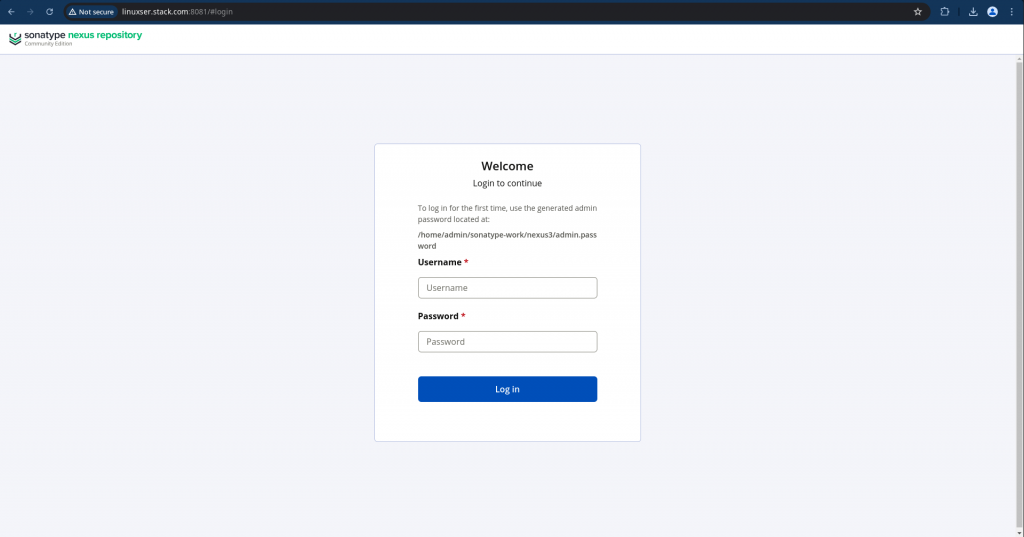
On the welcome page you will be asked to change your default “admin” password and configure repository.
For this demo i am enabling anonymous access which allows anybody to search, download artifacts from the repository.
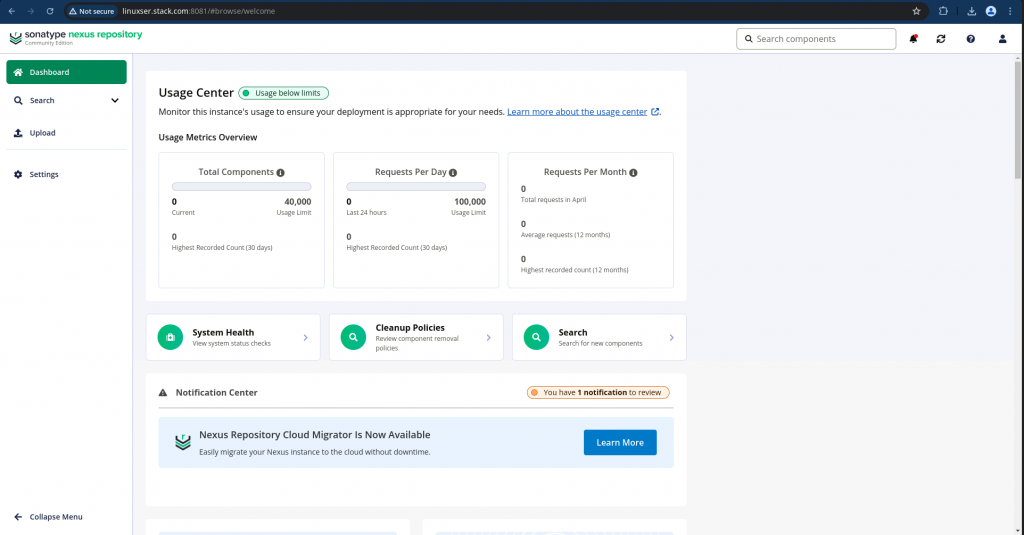
Also you can check the nexus process and the postgres connections that are established as shown below.
admin@linuxser:~$ ps -ef | grep nexus
admin      14383       1 99 18:33 pts/0    00:02:02 /home/admin/nexus-3.91.1-04/jdk/temurin_21.0.9_10_linux_x86_64/jdk-21.0.9+10/bin/java -server -Dnexus.installer.type=linux-x86-64 -Xms2703m -Xmx2703m -XX:+UnlockDiagnosticVMOptions -XX:+LogVMOutput -XX:LogFile=../sonatype-work/nexus3/log/jvm.log -XX:-OmitStackTraceInFastThrow -Dkaraf.home=. -Dkaraf.base=. -Djava.util.logging.config.file=etc/spring/java.util.logging.properties -Dkaraf.data=../sonatype-work/nexus3 -Dkaraf.log=../sonatype-work/nexus3/log -Djava.io.tmpdir=../sonatype-work/nexus3/tmp -Djdk.tls.ephemeralDHKeySize=2048 -Dfile.encoding=UTF-8 --add-reads=java.xml=java.logging --add-opens java.base/java.security=ALL-UNNAMED --add-opens java.base/java.net=ALL-UNNAMED --add-opens java.base/java.lang=ALL-UNNAMED --add-opens java.base/java.util=ALL-UNNAMED --add-opens java.naming/javax.naming.spi=ALL-UNNAMED --add-opens java.rmi/sun.rmi.transport.tcp=ALL-UNNAMED --add-exports=java.base/sun.net.www.protocol.http=ALL-UNNAMED --add-exports=java.base/sun.net.www.protocol.https=ALL-UNNAMED --add-exports=java.base/sun.net.www.protocol.jar=ALL-UNNAMED --add-exports=jdk.xml.dom/org.w3c.dom.html=ALL-UNNAMED --add-exports=jdk.naming.rmi/com.sun.jndi.url.rmi=ALL-UNNAMED --add-exports=java.security.sasl/com.sun.security.sasl=ALL-UNNAMED --add-exports=java.base/sun.security.x509=ALL-UNNAMED --add-exports=java.base/sun.security.rsa=ALL-UNNAMED --add-exports=java.base/sun.security.pkcs=ALL-UNNAMED -jar /home/admin/nexus-3.91.1-04/bin/sonatype-nexus-repository-3.91.1-04.jar
postgres   14456    9707  2 18:34 ?        00:00:02 postgres: nexus nexus 127.0.0.1(49344) idle
postgres   14460    9707  0 18:34 ?        00:00:00 postgres: nexus nexus 127.0.0.1(49354) idle
postgres   14461    9707  0 18:34 ?        00:00:00 postgres: nexus nexus 127.0.0.1(49360) idle
postgres   14462    9707  0 18:34 ?        00:00:00 postgres: nexus nexus 127.0.0.1(49374) idle
postgres   14463    9707  0 18:34 ?        00:00:00 postgres: nexus nexus 127.0.0.1(49386) idle
admin      14572   10590  0 18:35 pts/0    00:00:00 grep --color=auto nexus
The “nexus” database is connected from the nexus application and it populates the following tables under the schema “nexus”.
admin@linuxser:~$ psql -h localhost -U nexus -d nexus
Password for user nexus:
psql (16.11)
Type "help" for help.

nexus=> \dt;
                     List of relations
 Schema |               Name                | Type  | Owner
--------+-----------------------------------+-------+-------
 nexus  | aggregated_metrics                | table | nexus
 nexus  | anonymous_configuration           | table | nexus
 nexus  | api_key                           | table | nexus
 nexus  | api_key_v2                        | table | nexus
 nexus  | apt_asset                         | table | nexus
 nexus  | apt_asset_blob                    | table | nexus
 nexus  | apt_browse_node                   | table | nexus
 nexus  | apt_component                     | table | nexus
 nexus  | apt_content_repository            | table | nexus
 nexus  | apt_key_value                     | table | nexus
 nexus  | blob_store_configuration          | table | nexus
 nexus  | blob_store_metrics                | table | nexus
 nexus  | capability_storage_item           | table | nexus
 nexus  | cargo_asset                       | table | nexus
 nexus  | cargo_asset_blob                  | table | nexus
 nexus  | cargo_browse_node                 | table | nexus
 nexus  | cargo_component                   | table | nexus
 nexus  | cargo_content_repository          | table | nexus
 nexus  | cleanup_policy                    | table | nexus
 nexus  | cocoapods_asset                   | table | nexus
 nexus  | cocoapods_asset_blob              | table | nexus
 nexus  | cocoapods_browse_node             | table | nexus
 nexus  | cocoapods_component               | table | nexus
Hope you enjoyed reading this article. Thank you..

Related Posts