How to setup JFrog Artifactory and Publish maven artifacts

Here in this article we will try to setup JFrog Artifactory using the OSS package and publish a sample maven artifacts to the JFrog Artifactory repository.
Test Environment
- Fedora 41 server
Procedure
Step1: Ensure Docker installed
As a pre-requisite step ensure that docker and docker-compose is installed and running.
admin@fedser:~$ docker -v
Docker version 23.0.1, build a5ee5b1

admin@fedser:~$ docker-compose -v
docker-compose version 1.29.2, build 5becea4c

admin@fedser:~$ sudo systemctl status docker.service
[sudo] password for admin:
● docker.service - Docker Application Container Engine
     Loaded: loaded (/usr/lib/systemd/system/docker.service; disabled; preset: disabled)
     Active: active (running) since Tue 2023-02-28 11:53:22 IST; 4h 30min ago
Step2: Ensure Maven installed
Here we will install maven which is a build tool we will be using to build pom based java project.
admin@fedser:~$ sudo dnf install maven
Step3: Setup JFROG Home directory
Let’s first create a JFROG home directory for data persistence and export it as environment variable by updated the .bashrc file.
admin@fedser:~$ sudo mkdir -p /usr/local/jfrog

admin@fedser:~$ cat ~/.bashrc | grep JFROG
## JFROG Home
export JFROG_HOME=/usr/local/jfrog
Step4: Download and Extract JFROG docker compose archive
Now let’s download and extract the JFROG docker compose archive package. Here we are downloading the OSS type package for this demo.
admin@fedser:~$ curl -g -L -O -J 'https://releases.jfrog.io/artifactory/bintray-artifactory/org/artifactory/oss/docker/jfrog-artifactory-oss/7.133.17/jfrog-artifactory-oss-7.133.17-compose.tar.gz'

admin@fedser:~$ tar -xvf jfrog-artifactory-oss-7.133.17-compose.tar.gz
Step5: Setup Folders for data persistence
Let’s create sub directories within the JFROG home directory and update the ownership as shown below. JFROG service uses (uid: 1030 and gid: 1030) within the container.
admin@fedser:~$ mkdir -p $JFROG_HOME/artifactory/var
admin@fedser:~$ mkdir -p $JFROG_HOME/artifactory/var/data
admin@fedser:~$ mkdir -p $JFROG_HOME/artifactory/var/etc
Update ownership for the folder structure as below.
admin@fedser:~$ sudo chown -R 1030:1030 $JFROG_HOME/artifactory/var
admin@fedser:~$ sudo chown -R 1030:1030 $JFROG_HOME/artifactory/var/data
admin@fedser:~$ sudo chown -R 1030:1030 $JFROG_HOME/artifactory/var/etc
Step6: Update .env hidden file
Here in this step we are going the updated .env file with “ROOT_DATA_DIR” and node ip and name details as shown below. Update it with your respective hostname and ip address.
admin@fedser:artifactory-oss-7.133.17$ cat .env
## This file contains environment variables used by the docker-compose yaml files

## IMPORTANT: During installation, this file may be updated based on user choices or existing configuration

## Docker registry to fetch images from
DOCKER_REGISTRY=releases-docker.jfrog.io

## Version of artifactory to install
ARTIFACTORY_VERSION=7.133.17

## The Installation directory for Artifactory. IF not entered, the script will prompt you for this input. Default [$HOME/.jfrog/artifactory]
ROOT_DATA_DIR=$JFROG_HOME/artifactory

## Router external port mapping. This property may be overridden from the system.yaml (router.entrypoints.externalPort)
JF_ROUTER_ENTRYPOINTS_EXTERNALPORT=8082

## Nginx logrotation configuration
NGINX_LOG_ROTATE_COUNT=
NGINX_LOG_ROTATE_SIZE=
JF_SHARED_NODE_IP=192.168.29.117
JF_SHARED_NODE_ID=fedser.stack.com
JF_SHARED_NODE_NAME=fedser.stack.com
Step7: Create and Update system.yaml
Ensure that you create a system.yaml file with the following ownership (ie. artifactory uid: 1030 and gid: 1030) as shown below.
admin@fedser:artifactory-oss-7.133.17$ ls -ltr system.yaml
-rw-r--r--. 1 1030 1030 2605 Apr 14 08:14 system.yaml
Update the system.yaml file such that jfconnect service is disabled to ensure entitlement checks are not carried out as we are using the OSS type of JFROG package.
admin@fedser:artifactory-oss-7.133.17$ cat system.yaml
## @formatter:off
## JFROG ARTIFACTORY SYSTEM CONFIGURATION FILE
## HOW TO USE: comment-out any field and keep the correct yaml indentation by deleting only the leading '#' character.
configVersion: 1
## NOTE: JFROG_HOME is a place holder for the JFrog root directory containing the deployed product, the home directory for all JFrog products.
## Replace JFROG_HOME with the real path! For example, in RPM install, JFROG_HOME=/opt/jfrog

## NOTE: Sensitive information such as passwords and join key are encrypted on first read.
## NOTE: The provided commented key and value is the default.

## SHARED CONFIGURATIONS
## A shared section for keys across all services in this config
shared:
    ## Java 21 distribution to use
    #javaHome: "JFROG_HOME/artifactory/app/third-party/java"

    ## Extra Java options to pass to the JVM. These values add to or override the defaults.
    #extraJavaOpts: "-Xms512m -Xmx2g"

    ## Security Configuration
    security:
    ## Join key value for joining the cluster (takes precedence over 'joinKeyFile')
    #   joinKey: "<Your joinKey>"

    ## Join key file location
    #   joinKeyFile: "<For example: JFROG_HOME/artifactory/var/etc/security/join.key>"

    ## Master key file location
    ## Generated by the product on first startup if not provided
    #   masterKeyFile: "<For example: JFROG_HOME/artifactory/var/etc/security/master.key>"

    ## Maximum time to wait for key files (master.key and join.key)
    #   bootstrapKeysReadTimeoutSecs: 120
    #
    ## Node Settings
    node:
        ## A unique id to identify this node.
        ## Default auto generated at startup.
        id: "fedser.stack.com"
        ## Default auto resolved by startup script
        ip: 192.168.29.117
    ## Sets this node as primary in HA installation
    #   primary: true

    ## Sets this node as part of HA installation
    #   haEnabled: true

    ## Database Configuration
    database:
    ## To run Artifactory with any database other than PostgreSQL allowNonPostgresql set to true.
    #   allowNonPostgresql: false

    ## One of mysql, oracle, mssql, postgresql, mariadb
    ## Default Embedded derby

    ## Example for postgresql
    #   type: postgresql
    #   driver: org.postgresql.Driver
    #   url: "jdbc:postgresql://<your db url, for example: localhost:5432>/artifactory"
    #   username: artifactory
    #   password: password
access:
## Extra Java options to pass to the JVM. These values add to or override the defaults.
#extraJavaOpts: "-XX:InitialRAMPercentage=20 -XX:MaxRAMPercentage=25"

## JFCONNECT TEMPLATE
jfconnect:
    enabled: false
Step8: Copy and Update Docker Compose file
In this step switch to the directory where the JFROG archive package is extracted and copy the following template docker compose file to the root directory location.
admin@fedser:artifactory-oss-7.133.17$ cp templates/docker-compose-volumes.yaml docker-compose.yaml
Now we need to update the docker-compose.yaml file volumes section such that it uses the manually created host level folder structure for the data persistence rather than docker volumes. Also we need to volume mount the system.yaml file into the artifactory service to disable entitlement checks.
admin@fedser:artifactory-oss-7.133.17$ cat docker-compose.yaml
version: '3'
services:
  postgres:
    image: ${DOCKER_REGISTRY}/postgres:17.6-alpine
    container_name: postgresql
    environment:
      - POSTGRES_DB=artifactory
      - POSTGRES_USER=artifactory
      - POSTGRES_PASSWORD=password
    ports:
      - 5432:5432
    volumes:
      - ${ROOT_DATA_DIR}/var/data/postgres/data:/var/lib/postgresql/data
      - /etc/localtime:/etc/localtime:ro
    #restart: always
    logging:
      driver: json-file
      options:
        max-size: "50m"
        max-file: "10"
    ulimits:
      nproc: 65535
      nofile:
        soft: 32000
        hard: 40000
  artifactory:
    image: ${DOCKER_REGISTRY}/jfrog/artifactory-oss:${ARTIFACTORY_VERSION}
    container_name: artifactory
    volumes:
      - ${ROOT_DATA_DIR}/var:/var/opt/jfrog/artifactory
      - ./system.yaml:/var/opt/jfrog/artifactory/etc/system.yaml
      - /etc/localtime:/etc/localtime:ro
    #restart: always
    depends_on:
      - postgres
    ulimits:
      nproc: 65535
      nofile:
        soft: 32000
        hard: 40000
    environment:
      - ENABLE_MIGRATION=y
      - JF_SHARED_DATABASE_TYPE=postgresql
      # The following must match the POSTGRES_USER and POSTGRES_PASSWORD values passed to PostgreSQL
      - JF_SHARED_DATABASE_USERNAME=artifactory
      - JF_SHARED_DATABASE_PASSWORD=password
      - JF_SHARED_DATABASE_URL=jdbc:postgresql://postgresql:5432/artifactory
      - JF_SHARED_DATABASE_DRIVER=org.postgresql.Driver
      - JF_SHARED_NODE_IP=${JF_SHARED_NODE_IP}
      - JF_SHARED_NODE_ID=${JF_SHARED_NODE_ID}
      - JF_SHARED_NODE_NAME=${JF_SHARED_NODE_NAME}
      - JF_ROUTER_ENTRYPOINTS_EXTERNALPORT=${JF_ROUTER_ENTRYPOINTS_EXTERNALPORT}
    ports:
      - ${JF_ROUTER_ENTRYPOINTS_EXTERNALPORT}:${JF_ROUTER_ENTRYPOINTS_EXTERNALPORT} # for router communication
      - 8081:8081 # for artifactory communication
    logging:
      driver: json-file
      options:
        max-size: "50m"
        max-file: "10"
volumes:
  artifactory_data:
    external: true
  postgres_data:
    external: true
Step9: Instantiate JFROG and Postgres services
It’s time to start up our JFROG service as shown below.
admin@fedser:artifactory-oss-7.133.17$ docker compose up -d
Step10: Validate JFROG service
We can validate the JFROG service with the default credentials.
user: admin
pass: password
URL: http://fedser.stack.com:8082/ui
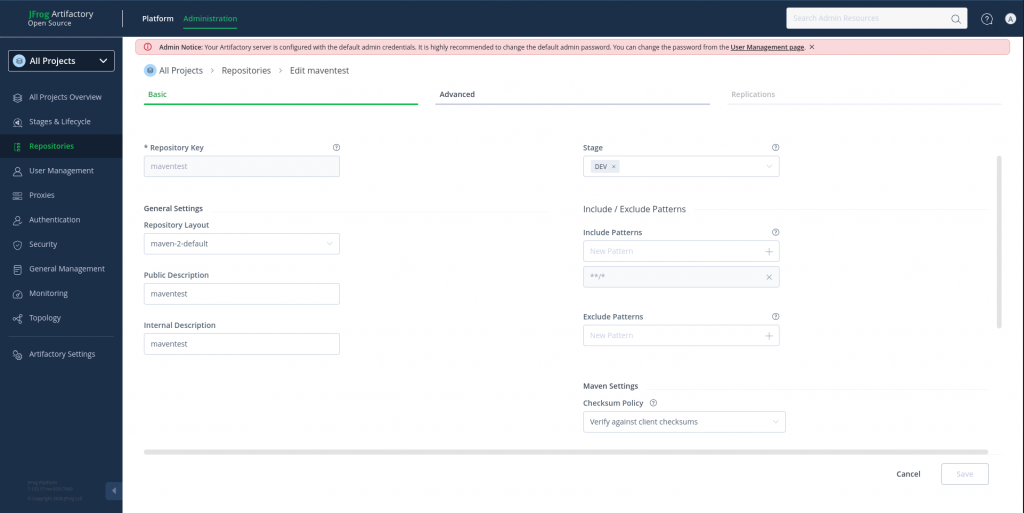
Step11: Create a JFROG maven repository
Let’s now create a maven repository from the JFROG portal as shown below.
Step12: Generate a sample maven project
Here we are going to generate a sample maven project using the mvn build tool.
admin@fedser:~$ mvn archetype:generate -DgroupId=com.mycompany.app -DartifactId=my-app -DarchetypeArtifactId=maven-archetype-quickstart -DarchetypeVersion=1.5 -DinteractiveMode=false
Step13: Update pom.xml and settings.xml
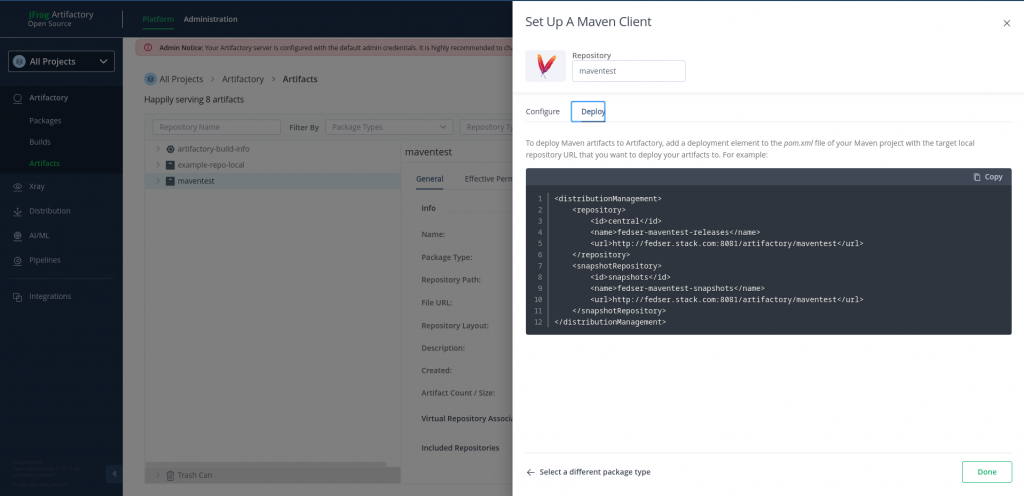
Let’s now update the pom.xml with “dependencyManagement” section details which we can get from the respository deploy section.
admin@fedser:my-app$ cat pom.xml
<?xml version="1.0" encoding="UTF-8"?>
<project xmlns="http://maven.apache.org/POM/4.0.0" xmlns:xsi="http://www.w3.org/2001/XMLSchema-instance"
  xsi:schemaLocation="http://maven.apache.org/POM/4.0.0 http://maven.apache.org/xsd/maven-4.0.0.xsd">
  <modelVersion>4.0.0</modelVersion>

  <groupId>com.mycompany.app</groupId>
  <artifactId>my-app</artifactId>
  <version>1.0-SNAPSHOT</version>

  <name>my-app</name>
  <!-- FIXME change it to the project's website -->
  <url>http://www.example.com</url>

  <properties>
    <project.build.sourceEncoding>UTF-8</project.build.sourceEncoding>
    <maven.compiler.release>17</maven.compiler.release>
  </properties>

  <dependencyManagement>
    <dependencies>
      <dependency>
        <groupId>org.junit</groupId>
        <artifactId>junit-bom</artifactId>
        <version>5.11.0</version>
        <type>pom</type>
        <scope>import</scope>
      </dependency>
    </dependencies>
  </dependencyManagement>

  <dependencies>
    <dependency>
      <groupId>org.junit.jupiter</groupId>
      <artifactId>junit-jupiter-api</artifactId>
      <scope>test</scope>
    </dependency>
    <!-- Optionally: parameterized tests support -->
    <dependency>
      <groupId>org.junit.jupiter</groupId>
      <artifactId>junit-jupiter-params</artifactId>
      <scope>test</scope>
    </dependency>
  </dependencies>

  <build>
    <pluginManagement><!-- lock down plugins versions to avoid using Maven defaults (may be moved to parent pom) -->
      <plugins>
        <!-- clean lifecycle, see https://maven.apache.org/ref/current/maven-core/lifecycles.html#clean_Lifecycle -->
        <plugin>
          <artifactId>maven-clean-plugin</artifactId>
          <version>3.4.0</version>
        </plugin>
        <!-- default lifecycle, jar packaging: see https://maven.apache.org/ref/current/maven-core/default-bindings.html#Plugin_bindings_for_jar_packaging -->
        <plugin>
          <artifactId>maven-resources-plugin</artifactId>
          <version>3.3.1</version>
        </plugin>
        <plugin>
          <artifactId>maven-compiler-plugin</artifactId>
          <version>3.13.0</version>
        </plugin>
        <plugin>
          <artifactId>maven-surefire-plugin</artifactId>
          <version>3.3.0</version>
        </plugin>
        <plugin>
          <artifactId>maven-jar-plugin</artifactId>
          <version>3.4.2</version>
        </plugin>
        <plugin>
          <artifactId>maven-install-plugin</artifactId>
          <version>3.1.2</version>
        </plugin>
        <plugin>
          <artifactId>maven-deploy-plugin</artifactId>
          <version>3.1.2</version>
        </plugin>
        <!-- site lifecycle, see https://maven.apache.org/ref/current/maven-core/lifecycles.html#site_Lifecycle -->
        <plugin>
          <artifactId>maven-site-plugin</artifactId>
          <version>3.12.1</version>
        </plugin>
        <plugin>
          <artifactId>maven-project-info-reports-plugin</artifactId>
          <version>3.6.1</version>
        </plugin>
      </plugins>
    </pluginManagement>
  </build>

<distributionManagement>
    <repository>
        <id>central</id>
        <name>fedser-maventest-releases</name>
        <url>http://fedser.stack.com:8081/artifactory/maventest</url>
    </repository>
    <snapshotRepository>
        <id>snapshots</id>
        <name>fedser-maventest-snapshots</name>
        <url>http://fedser.stack.com:8081/artifactory/maventest</url>
    </snapshotRepository>
</distributionManagement>

</project>
Create and Update “~/.m2/settings.xml” file with the releases and snapshots repository credentials to connect. As we have created the repository with Stage as DEV, we will be using this repository to upload snapshot artifacts. Ensure snapshotRepository id and server id matches.
admin@fedser:~$ cat ~/.m2/settings.xml
<settings>
    <servers>
        <server>
            <id>releases</id>
            <username>admin</username>
            <password>password</password>
        </server>
        <server>
            <id>snapshots</id>
            <username>admin</username>
            <password>password</password>
        </server>

    </servers>
</settings>
Step14: Publish maven artifact
Now let’s try to deploy the application which basically will build the jar package and upload it to the connected JFROG artifactory repository.
admin@fedser:my-app$ mvn deploy
[INFO] Scanning for projects...
[INFO]
[INFO] ----------------------< com.mycompany.app:my-app >----------------------
[INFO] Building my-app 1.0-SNAPSHOT
[INFO]   from pom.xml
[INFO] --------------------------------[ jar ]---------------------------------
[INFO]
[INFO] --- resources:3.3.1:resources (default-resources) @ my-app ---
[INFO] skip non existing resourceDirectory /home/admin/middleware/stack/vscodeprojects/my-app/src/main/resources
[INFO]
[INFO] --- compiler:3.13.0:compile (default-compile) @ my-app ---
[INFO] Nothing to compile - all classes are up to date.
[INFO]
[INFO] --- resources:3.3.1:testResources (default-testResources) @ my-app ---
[INFO] skip non existing resourceDirectory /home/admin/middleware/stack/vscodeprojects/my-app/src/test/resources
[INFO]
[INFO] --- compiler:3.13.0:testCompile (default-testCompile) @ my-app ---
[INFO] Nothing to compile - all classes are up to date.
[INFO]
[INFO] --- surefire:3.3.0:test (default-test) @ my-app ---
[INFO] Using auto detected provider org.apache.maven.surefire.junitplatform.JUnitPlatformProvider
[INFO]
[INFO] -------------------------------------------------------
[INFO]  T E S T S
[INFO] -------------------------------------------------------
[INFO] Running com.mycompany.app.AppTest
[INFO] Tests run: 1, Failures: 0, Errors: 0, Skipped: 0, Time elapsed: 0.034 s -- in com.mycompany.app.AppTest
[INFO]
[INFO] Results:
[INFO]
[INFO] Tests run: 1, Failures: 0, Errors: 0, Skipped: 0
[INFO]
[INFO]
[INFO] --- jar:3.4.2:jar (default-jar) @ my-app ---
[INFO]
[INFO] --- install:3.1.2:install (default-install) @ my-app ---
[INFO] Installing /home/admin/middleware/stack/vscodeprojects/my-app/pom.xml to /home/admin/.m2/repository/com/mycompany/app/my-app/1.0-SNAPSHOT/my-app-1.0-SNAPSHOT.pom
[INFO] Installing /home/admin/middleware/stack/vscodeprojects/my-app/target/my-app-1.0-SNAPSHOT.jar to /home/admin/.m2/repository/com/mycompany/app/my-app/1.0-SNAPSHOT/my-app-1.0-SNAPSHOT.jar
[INFO]
[INFO] --- deploy:3.1.2:deploy (default-deploy) @ my-app ---
Downloading from snapshots: http://fedser.stack.com:8081/artifactory/maventest/com/mycompany/app/my-app/1.0-SNAPSHOT/maven-metadata.xml
Downloaded from snapshots: http://fedser.stack.com:8081/artifactory/maventest/com/mycompany/app/my-app/1.0-SNAPSHOT/maven-metadata.xml (767 B at 8.4 kB/s)
Uploading to snapshots: http://fedser.stack.com:8081/artifactory/maventest/com/mycompany/app/my-app/1.0-SNAPSHOT/my-app-1.0-20260414.074426-3.pom
Uploaded to snapshots: http://fedser.stack.com:8081/artifactory/maventest/com/mycompany/app/my-app/1.0-SNAPSHOT/my-app-1.0-20260414.074426-3.pom (3.5 kB at 53 kB/s)
Uploading to snapshots: http://fedser.stack.com:8081/artifactory/maventest/com/mycompany/app/my-app/1.0-SNAPSHOT/my-app-1.0-20260414.074426-3.jar
Uploaded to snapshots: http://fedser.stack.com:8081/artifactory/maventest/com/mycompany/app/my-app/1.0-SNAPSHOT/my-app-1.0-20260414.074426-3.jar (2.9 kB at 62 kB/s)
Downloading from snapshots: http://fedser.stack.com:8081/artifactory/maventest/com/mycompany/app/my-app/maven-metadata.xml
Downloaded from snapshots: http://fedser.stack.com:8081/artifactory/maventest/com/mycompany/app/my-app/maven-metadata.xml (370 B at 46 kB/s)
Uploading to snapshots: http://fedser.stack.com:8081/artifactory/maventest/com/mycompany/app/my-app/1.0-SNAPSHOT/maven-metadata.xml
Uploaded to snapshots: http://fedser.stack.com:8081/artifactory/maventest/com/mycompany/app/my-app/1.0-SNAPSHOT/maven-metadata.xml (767 B at 51 kB/s)
Uploading to snapshots: http://fedser.stack.com:8081/artifactory/maventest/com/mycompany/app/my-app/maven-metadata.xml
Uploaded to snapshots: http://fedser.stack.com:8081/artifactory/maventest/com/mycompany/app/my-app/maven-metadata.xml (315 B at 17 kB/s)
[INFO] ------------------------------------------------------------------------
[INFO] BUILD SUCCESS
[INFO] ------------------------------------------------------------------------
[INFO] Total time:  1.638 s
[INFO] Finished at: 2026-04-14T09:44:28+02:00
[INFO] ------------------------------------------------------------------------
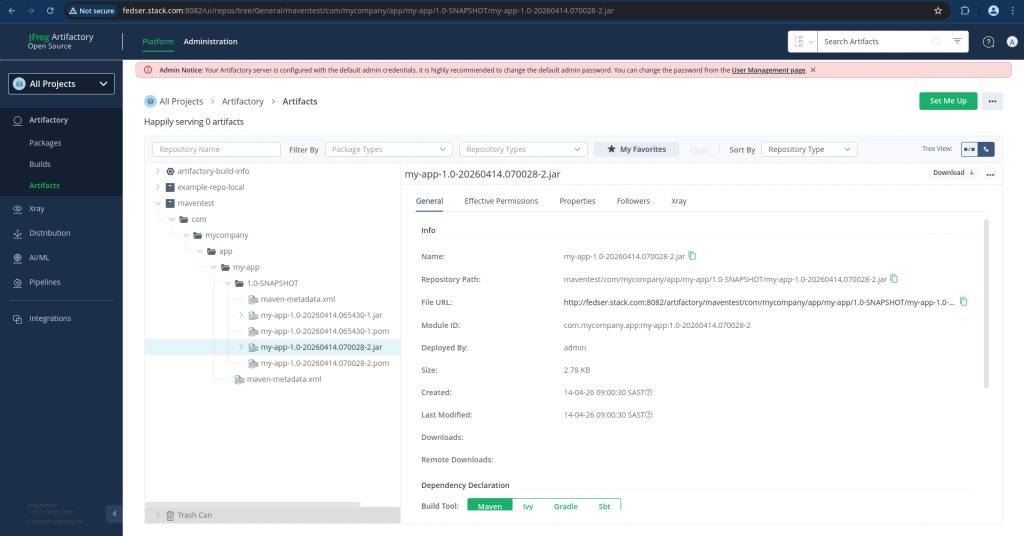
Step15: Validate maven artifact in JFROG
Here you can navigate in the JFROG portal to the Artifacts section and verify that the artifact has been uploaded.
Hope you enjoyed reading this article. Thank you..



Related Posts