Layers of abstraction for interacting with relational databases
Here in this article we will try to understand about the different layers of abstractions that we can use to interact with a relational database using the MariaDB database and SQLAlchemy toolkit.
Test Environment
- Fedora 41 server
- MariaDB server v10.11.11
- SQLAlchemy toolkit v2.1.6
What is MariaDB Database server
MariaDB Server is a general purpose open source relational database management system. It’s one of the most popular database servers in the world, with notable users including Wikipedia, WordPress.com and Google. MariaDB Server is released under the GPLv2 open source licence and is guaranteed to remain open source.
What is SQLAlchemy
The SQLAlchemy SQL Toolkit and Object Relational Mapper is a comprehensive set of tools for working with databases and Python. It has several distinct areas of functionality which can be used individually or combined together.
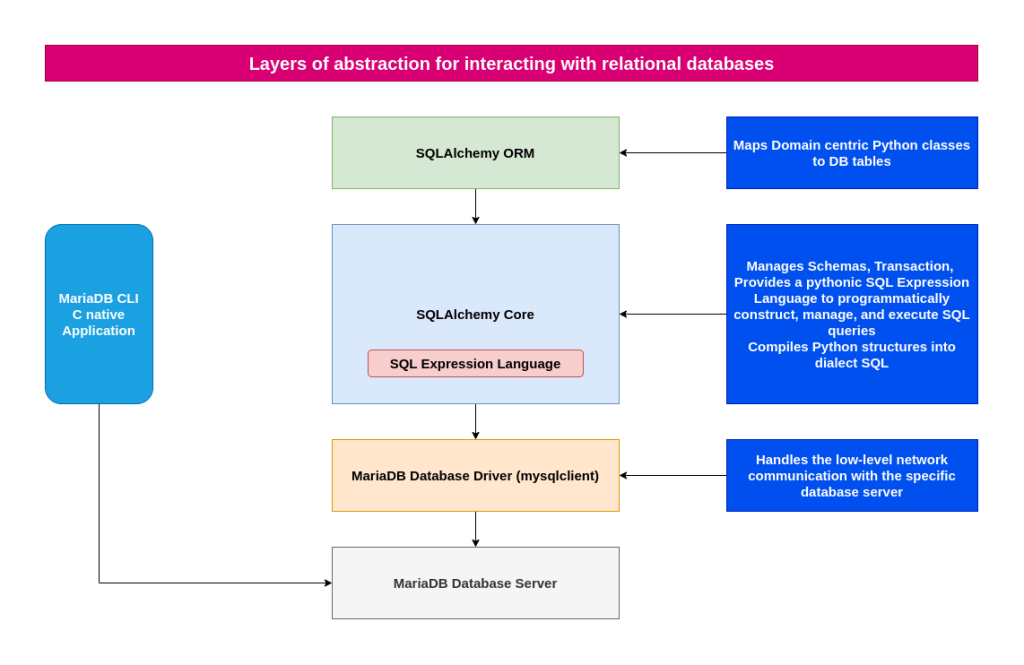
The two most significant front-facing portions of SQLAlchemy are the Object Relational Mapper (ORM) and the Core. Core contains the breadth of SQLAlchemy’s SQL and database integration and description services, the most prominent part of this being the SQL Expression Language.
High Level Architecture
If you are interested in watching the video. Here is the YouTube video on the same step by step procedure outlined below.
Setting up the Database server
As a first step ensure that you have some kind of Relational Database Management Service (ie. RDBMS) installed on your system. Here we are going to install MariaDB server and secure the instace.
# Install Mariadb server
admin@linuxser:~$ sudo dnf install mariadb mariadb-server

# Start database service
admin@linuxser:~$ sudo systemctl start mariadb
admin@linuxser:~$ sudo systemctl status mariadb

# Secure instance
admin@linuxser:~$ sudo mariadb-secure-installation
Once our db services is up and running we can connect to it using the root user and create our database.
# Connect to the database
admin@linuxser:~$ mariadb -u root -p

# Create a database if not exists
MariaDB [(none)]> CREATE DATABASE IF NOT EXISTS inventory;
Query OK, 1 row affected (0.001 sec)

# List the databases
MariaDB [(none)]> SHOW DATABASES;
+--------------------+
| Database           |
+--------------------+
| information_schema |
| inventory          |
| mysql              |
| performance_schema |
| sys                |
+--------------------+
5 rows in set (0.001 sec)

MariaDB [(none)]> exit
Now let’s connect to the database to create a table.
# Connect to database inventory
admin@linuxser:~$ mariadb -u root -p inventory

# Create a table
MariaDB [inventory]> CREATE TABLE books (
    ->     isbn CHAR(20) PRIMARY KEY,
    ->     title VARCHAR(100),
    ->     author_id INT,
    ->     publisher_id INT,
    ->     year_pub CHAR(4),
    ->     description TEXT
    -> );
Query OK, 0 rows affected (0.024 sec)

# Describe table
MariaDB [inventory]> DESCRIBE books;
+--------------+--------------+------+-----+---------+-------+
| Field        | Type         | Null | Key | Default | Extra |
+--------------+--------------+------+-----+---------+-------+
| isbn         | char(20)     | NO   | PRI | NULL    |       |
| title        | varchar(100) | YES  |     | NULL    |       |
| author_id    | int(11)      | YES  |     | NULL    |       |
| publisher_id | int(11)      | YES  |     | NULL    |       |
| year_pub     | char(4)      | YES  |     | NULL    |       |
| description  | text         | YES  |     | NULL    |       |
+--------------+--------------+------+-----+---------+-------+
So mariadb CLI tool is the lowest level abrstraction that is provided by the mariadb db opensource database provider which helps us to connect to the database, create a database, create table within that database and describe the table structure. It is a native C application that communicates directly with the database.
This is just some of the database management tasks that i have shown but there is a lot that can be done using this CLI tool.
Setting up Python Project environment
Before we start using the SQLAlchemy toolkit, we need to setup the python project environment. Here we are creating a directory and setting a virtual python environment wherein we will install the sqlalchemy toolkit and mysqlclient mariadb driver as shown below.
admin@linuxser:~$ mkdir sqlalchemy
admin@linuxser:~$ cd sqlalchemy/
admin@linuxser:~/sqlalchemy$ python -m venv env
admin@linuxser:~/sqlalchemy$ source env/bin/activate
(env) admin@linuxser:~/sqlalchemy$ pip install sqlalchemy mysqlclient
Using SQLAlchemy Core constructs
This is the second level of abstraction provided by the SQLAlchemy toolkit which can be used to establish a connection with the database and execute the queries against it.
Every SQLAlchemy application that connects to a database needs to use an Engine.
- ENGINE: This object acts as a central source of connections to a particular database, providing both a factory as well as a holding space called a connection pool for these database connections.
The primary endpoints provided by the engine object are the Connection and Result. So we are going to use these two DBAPI’s provided by the engine object to connect to the database, execute the query and fetch the result set.
Underneath, SQL Expression language is the core component provided by the SQLAlchemy Core layer which is leveraged by both the SQLAlchemy Core and ORM layers which we will look at in the later section to construct the SQL queries.
The default behavior of the Python DBAPI is that a transaction is always in progress; when the connection is released, a ROLLBACK is emitted to end the transaction. The transaction is not committed automatically; if we want to commit data we need to call Connection.commit().
But in most relational databases, executing a DDL statement like CREATE automatically triggers an implicit commit for any open transaction. This means you cannot roll back a CREATE statement using a ROLLBACK command, even if you did not issue an explicit COMMIT.
Here is the sample python script wherein we first import the sqlalchemy module and from there we import the create_engine and text attributes.
We use the create engine object to pass the database connection string and get an engine object. Here we haven’t established the connection to the database yet. The connection is established when we pass the query to the execute function as shown below. We are passing the query in the text() object which is one of the method to execute a query using the core components.
(env) admin@linuxser:~/sqlalchemy$ cat sqlcoredemo.py
import sqlalchemy
from sqlalchemy import create_engine
from sqlalchemy import text

print(sqlalchemy.__version__ )
engine = create_engine("mysql+mysqldb://root:admin%401234@localhost/inventory", echo=False)

with engine.connect() as conn:
  conn.execute(text("CREATE TABLE books ( \
    isbn CHAR(20) PRIMARY KEY, \
    title VARCHAR(50), \
    author_id INT, \
    publisher_id INT, \
    year_pub CHAR(4), \
    description TEXT \
  );"))
Now let’s execute the python script which will connect to the database and execute our query to create a table named books.
(env) admin@linuxser:~/sqlalchemy$ python sqlcoredemo.py
Validate the books table has been created as shown below.
admin@linuxser:~$ mariadb -u root -p -h localhost inventory

MariaDB [inventory]> describe books;
+--------------+-------------+------+-----+---------+-------+
| Field        | Type        | Null | Key | Default | Extra |
+--------------+-------------+------+-----+---------+-------+
| isbn         | char(20)    | NO   | PRI | NULL    |       |
| title        | varchar(50) | YES  |     | NULL    |       |
| author_id    | int(11)     | YES  |     | NULL    |       |
| publisher_id | int(11)     | YES  |     | NULL    |       |
| year_pub     | char(4)     | YES  |     | NULL    |       |
| description  | text        | YES  |     | NULL    |       |
+--------------+-------------+------+-----+---------+-------+
6 rows in set (0.001 sec)

MariaDB [inventory]> drop table books;
Using SQLAlchemy Core constructs – Table Object
In a relational database on a high level we have database, consisting of multiple tables and each table consists of multiple columns.
The foundation for these SQL queries are Python objects that represent database concepts like tables and columns. These objects are known collectively as database metadata.
The most common foundational objects for database metadata in SQLAlchemy are known as MetaData, Table, and Column.
In a database table is the most basic data holding structure that consist of the data that we query. SQLAlchemy also provides with a similar Python object named “Table” to represent this database table.
This Table can be constructed programmatically, either directly by using the Table constructor, or indirectly by using ORM Mapped classes.
Here we are going to use the Table constructor first and later section we will look at the ORM Mapped classes.
- Metadata: Metadata object is basically a collection that hold information about the tables.
- Table: It represents a database table and assigns itself to a MetaData collection.
- Column: It represents a column in a database table, and assigns itself to a Table object.
- Integer, String, Text: These are classes represent SQL datatypes and can be passed to a Column with or without necessarily being instantiated.
Here is a sample python script wherein we leverage the SQLAlchemy Core constructs: MetaData, Table, Column, Integer, String and Text to create a books table.
(env) admin@linuxser:~/sqlalchemy$ cat sqltabledemo.py
import sqlalchemy
from sqlalchemy import create_engine
from sqlalchemy import MetaData, Table, Column, Integer, String, Text

print("SQLAlchemy Version: " + sqlalchemy.__version__)
engine = create_engine("mysql+mysqldb://root:admin%401234@localhost/inventory", echo=False)


metadata = MetaData()

books_table = Table(
  "books",
  metadata,
  Column("isbn", Integer, primary_key=True),
  Column("title", String(100)),
  Column("author_id", Integer),
  Column("publisher_id", Integer),
  Column("year_pub", String(4)),
  Column("description", Text),
)

print(books_table.c.keys())

metadata.create_all(engine)
Let’s now execute our script.
(env) admin@linuxser:~/sqlalchemy$ python sqltabledemo.py
Validate that the table is created.
# Connect ot Inventory database
(env) admin@linuxser:~/sqlalchemy$ mariadb -u root -p -h localhost inventory

# Describe books table
MariaDB [inventory]> describe books;
+--------------+--------------+------+-----+---------+----------------+
| Field        | Type         | Null | Key | Default | Extra          |
+--------------+--------------+------+-----+---------+----------------+
| isbn         | int(11)      | NO   | PRI | NULL    | auto_increment |
| title        | varchar(100) | YES  |     | NULL    |                |
| author_id    | int(11)      | YES  |     | NULL    |                |
| publisher_id | int(11)      | YES  |     | NULL    |                |
| year_pub     | varchar(4)   | YES  |     | NULL    |                |
| description  | text         | YES  |     | NULL    |                |
+--------------+--------------+------+-----+---------+----------------+

MariaDB [inventory]> drop table books;
Using SQLAlchemy ORM constructs – Declarative Form
This is the thrid layer of abstraction.SQLAlchemy ORM provides for a facade around the Table declaration process referred towards as Declarative Table. The Declarative Table process accomplishes the same goal as we had in the previous section, that of building Table objects, but also within that process gives us something else called an ORM mapped class, or just “mapped class”.
When using the ORM, the process by which we declare Table metadata is usually combined with the process of declaring mapped classes. This mapped python class basically contains the attributes that will be linked to the columns in a database table.
The metadata collection remains present, however it itself is associated with an ORM-only construct commonly referred towards as the Declarative Base.
(env) admin@linuxser:~/sqlalchemy$ cat sqlormdeclarative.py
import sqlalchemy
from sqlalchemy import create_engine, String, Text
from typing import List
from typing import Optional
from sqlalchemy.orm import DeclarativeBase
from sqlalchemy.orm import Mapped
from sqlalchemy.orm import mapped_column

print("SQLAlchemy Version: " + sqlalchemy.__version__)
engine = create_engine("mysql+mysqldb://root:admin%401234@localhost/inventory", echo=False)


class Base(DeclarativeBase):
  pass

class Books(Base):
  __tablename__ = "books"

  isbn: Mapped[int] = mapped_column(primary_key=True)
  title: Mapped[str] = mapped_column(String(100))
  author_id: Mapped[int] = mapped_column()
  publisher_id: Mapped[int] = mapped_column()
  year_pub: Mapped[str] = mapped_column(String(4))
  description: Mapped[str] = mapped_column(Text)

  def __repr__(self) -> str:
    return f"Books(isbn={self.isbn!r}, title={self.title!r}, author_id={self.author_id!r}, publisher_id={self.publisher_id!r}, year_pub={self.year_pub!r}, description={self.description!r})"

Base.metadata.create_all(engine)
Let’s now execute our script to map python classes to table data.
(env) admin@linuxser:~/sqlalchemy$ python sqlormdeclarative.py
Now let’s validatte the database table.
MariaDB [inventory]> describe books;
+--------------+--------------+------+-----+---------+----------------+
| Field        | Type         | Null | Key | Default | Extra          |
+--------------+--------------+------+-----+---------+----------------+
| isbn         | int(11)      | NO   | PRI | NULL    | auto_increment |
| title        | varchar(100) | NO   |     | NULL    |                |
| author_id    | int(11)      | NO   |     | NULL    |                |
| publisher_id | int(11)      | NO   |     | NULL    |                |
| year_pub     | varchar(4)   | NO   |     | NULL    |                |
| description  | text         | NO   |     | NULL    |                |
+--------------+--------------+------+-----+---------+----------------+
6 rows in set (0.003 sec)
Now we will exetend our script to include the code to insert data using the orm session object as shown below.
Session: It establishes all conversations with the database and represents a “holding zone” for all the objects which are loaded or associated with it during its lifespan. It requests a connection resource from an Engine that is associated with the Session, and then establishes a transaction on that connection. This transaction remains in effect until the Session is instructed to commit or roll back the transaction.
Here in the below python code, we are creating an instance of the Books class which basically maps to a record within the books table. The instance object “ie. python” is added to the session object. Once we commit the session object the row is added to the books table as shown below.
import sqlalchemy
from sqlalchemy import create_engine, String, Text
from typing import List
from typing import Optional
from sqlalchemy.orm import DeclarativeBase
from sqlalchemy.orm import Mapped
from sqlalchemy.orm import mapped_column

from sqlalchemy.orm import Session

print("SQLAlchemy Version: " + sqlalchemy.__version__)
engine = create_engine("mysql+mysqldb://root:admin%401234@localhost/inventory", echo=False)


class Base(DeclarativeBase):
  pass

class Books(Base):
  __tablename__ = "books"

  isbn: Mapped[int] = mapped_column(primary_key=True)
  title: Mapped[str] = mapped_column(String(100))
  author_id: Mapped[int] = mapped_column()
  publisher_id: Mapped[int] = mapped_column()
  year_pub: Mapped[str] = mapped_column(String(4))
  description: Mapped[str] = mapped_column(Text)

  def __repr__(self) -> str:
    return f"Books(isbn={self.isbn!r}, title={self.title!r}, author_id={self.author_id!r}, publisher_id={self.publisher_id!r}, year_pub={self.year_pub!r}, description={self.description!r})"

Base.metadata.create_all(engine)

python = Books(isbn=1234567, title="learning python", author_id=1, publisher_id=1212, year_pub="2001", description="Learning python 6th edition by Mark")

session = Session(engine)
session.add(python)
session.flush()
session.commit()
session.close()
Connect to the inventory database and validate the table data.
MariaDB [inventory]> select * from books;
+---------+-----------------+-----------+--------------+----------+-------------------------------------+
| isbn    | title           | author_id | publisher_id | year_pub | description                         |
+---------+-----------------+-----------+--------------+----------+-------------------------------------+
| 1234567 | learning python |         1 |         1212 | 2001     | Learning python 6th edition by Mark |
+---------+-----------------+-----------+--------------+----------+-------------------------------------+
1 row in set (0.001 sec)
Hope you enjoyed reading this article. Thank you..


Related Posts