How to manage access to AWS resources using IAM roles
Here in this article we will try to understand some basic of IAM and how we can leverage it for access control. AWS Identity and access management web service plays a very important role is managing access to the AWS resources from the AWS resources users.
Test Environment
- Fedora 41 server
- aws-cli v2.33.27
- Python 3.13.11
If you are interested in watching the video. Here is the YouTube video on the same step by step procedure outlined below.
Features
- Authentication and Authorization: IAM verifies whether the AWS resource user is authenticated (ie. signed in) and is authorized (ie. has permissions) to use resources.
- Shared Access to AWS Account: Grant other people permission to administer and use resources in your AWS account without having to share your password or access key
- Fine grained access control: It allows us to implement a policy to provide only the required permissions on the resources (ie. principle of least privilege).
- Multi-factor authentication (MFA): We can enable multi factor authentication for an identity to add an extra layer of security.
- Identity Federation:: It allows to seemlessly integrate users from your corporate network or other identity providers into the AWS account.
- Audit and Compliance:: It integrates with AWS CloudTrail to provide detailed logging and identity information to support auditing and compliance requirements.
Identity
- Root User Account: A first time user needs to register and create an account with the AWS. This account or identity is called the AWS Root user account which has complete access to all AWS services and resources.
- Non Administrative Account: It is recommended to create non administrative user account or identity using the IAM and grant only the required permissions based on the AWS resources that the identity would be leveraging or using.
An identity is also known as Principal. A principal such as an IAM user, AWS STS federated principal, IAM role, or application is an entity that is trsuted by the AWS account.
IAM like many other AWS services is eventually consistent. It means that any change carried out in IAM such as creating, updating, deleting users, groups or roles takes some time to replicate across multiple servers within Amazon’s data centers around the world.
That’s the reason it is not recommended to include IAM related changes within your applications workflow.
IAM User vs Role difference
The primary difference is that an AWS IAM User has long-term, static credentials tied directly to a single person or application, whereas an AWS IAM Role has no credentials and instead provides temporary, auto-rotating access tokens to any trusted entity that assumes it.
Policies
- Trust policies: Defines which principal can assume the role, and under which conditions. A trust policy is a specific type of resource-based policy for IAM roles. A role can have only one trust policy.
- Identity-based policies: These policies define the permissions that the user of the role is able to perform (or is denied from performing), and on which resources.
High Level Architecture
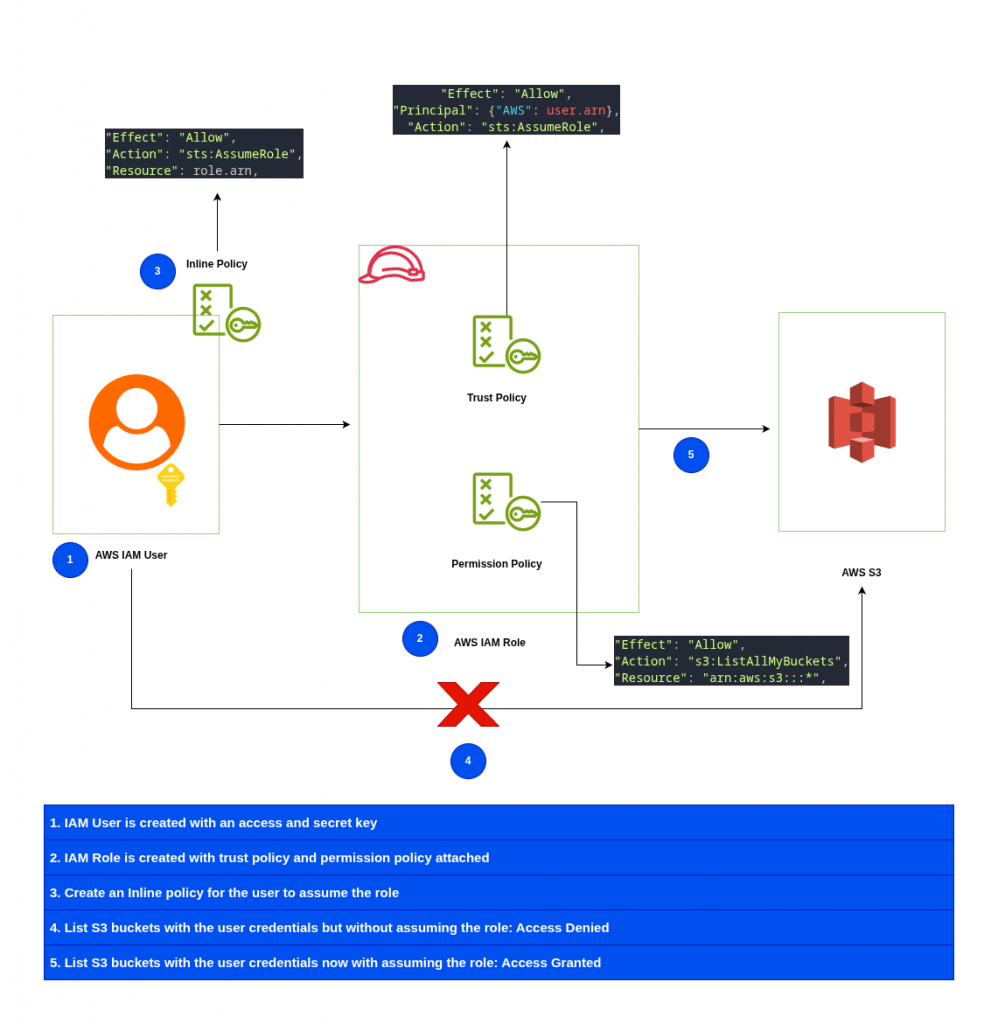
Now that we have some basic understanding about the AWS IAM service and the high level architecture that we are going to implement.
Let us look at the python script that we will be using to implement the same. This python script take from the AWS IAM documentation Learn the basics of IAM with an AWS SDK.
NOTE: Ensure AWS CLI is configured with Administrative user credentials for managing the AWS IAM resources.
admin@fedser:aws$ cat create_user_role_demo.py
import json
import sys
import time
from uuid import uuid4

import boto3
from botocore.exceptions import ClientError


def progress_bar(seconds):
    """Shows a simple progress bar in the command window."""
    for _ in range(seconds):
        time.sleep(1)
        print(".", end="")
        sys.stdout.flush()
    print()


def setup(iam_resource):
    """
    Creates a new user with no permissions.
    Creates an access key pair for the user.
    Creates a role with a policy that lets the user assume the role.
    Creates a policy that allows listing Amazon S3 buckets.
    Attaches the policy to the role.
    Creates an inline policy for the user that lets the user assume the role.

    :param iam_resource: A Boto3 AWS Identity and Access Management (IAM) resource
                         that has permissions to create users, roles, and policies
                         in the account.
    :return: The newly created user, user key, and role.
    """
    try:
        user = iam_resource.create_user(UserName=f"demo-user-{uuid4()}")
        print(f"Created user {user.name}.")
    except ClientError as error:
        print(
            f"Couldn't create a user for the demo. Here's why: "
            f"{error.response['Error']['Message']}"
        )
        raise

    try:
        user_key = user.create_access_key_pair()
        print(f"Created access key pair for user.")
    except ClientError as error:
        print(
            f"Couldn't create access keys for user {user.name}. Here's why: "
            f"{error.response['Error']['Message']}"
        )
        raise

    print(f"Wait for user to be ready.", end="")
    progress_bar(10)

    try:
        role = iam_resource.create_role(
            RoleName=f"demo-role-{uuid4()}",
            AssumeRolePolicyDocument=json.dumps(
                {
                    "Version":"2012-10-17",
                    "Statement": [
                        {
                            "Effect": "Allow",
                            "Principal": {"AWS": user.arn},
                            "Action": "sts:AssumeRole",
                        }
                    ],
                }
            ),
        )
        print(f"Created role {role.name}.")
    except ClientError as error:
        print(
            f"Couldn't create a role for the demo. Here's why: "
            f"{error.response['Error']['Message']}"
        )
        raise

    try:
        policy = iam_resource.create_policy(
            PolicyName=f"demo-policy-{uuid4()}",
            PolicyDocument=json.dumps(
                {
                    "Version":"2012-10-17",
                    "Statement": [
                        {
                            "Effect": "Allow",
                            "Action": "s3:ListAllMyBuckets",
                            "Resource": "arn:aws:s3:::*",
                        }
                    ],
                }
            ),
        )
        role.attach_policy(PolicyArn=policy.arn)
        print(f"Created policy {policy.policy_name} and attached it to the role.")
    except ClientError as error:
        print(
            f"Couldn't create a policy and attach it to role {role.name}. Here's why: "
            f"{error.response['Error']['Message']}"
        )
        raise

    try:
        user.create_policy(
            PolicyName=f"demo-user-policy-{uuid4()}",
            PolicyDocument=json.dumps(
                {
                    "Version":"2012-10-17",
                    "Statement": [
                        {
                            "Effect": "Allow",
                            "Action": "sts:AssumeRole",
                            "Resource": role.arn,
                        }
                    ],
                }
            ),
        )
        print(
            f"Created an inline policy for {user.name} that lets the user assume "
            f"the role."
        )
    except ClientError as error:
        print(
            f"Couldn't create an inline policy for user {user.name}. Here's why: "
            f"{error.response['Error']['Message']}"
        )
        raise

    print("Give AWS time to propagate these new resources and connections.", end="")
    progress_bar(10)

    return user, user_key, role


def show_access_denied_without_role(user_key):
    """
    Shows that listing buckets without first assuming the role is not allowed.

    :param user_key: The key of the user created during setup. This user does not
                     have permission to list buckets in the account.
    """
    print(f"Try to list buckets without first assuming the role.")
    s3_denied_resource = boto3.resource(
        "s3", aws_access_key_id=user_key.id, aws_secret_access_key=user_key.secret
    )
    try:
        for bucket in s3_denied_resource.buckets.all():
            print(bucket.name)
        raise RuntimeError("Expected to get AccessDenied error when listing buckets!")
    except ClientError as error:
        if error.response["Error"]["Code"] == "AccessDenied":
            print("Attempt to list buckets with no permissions: AccessDenied.")
        else:
            raise


def list_buckets_from_assumed_role(user_key, assume_role_arn, session_name):
    """
    Assumes a role that grants permission to list the Amazon S3 buckets in the account.
    Uses the temporary credentials from the role to list the buckets that are owned
    by the assumed role's account.

    :param user_key: The access key of a user that has permission to assume the role.
    :param assume_role_arn: The Amazon Resource Name (ARN) of the role that
                            grants access to list the other account's buckets.
    :param session_name: The name of the STS session.
    """
    sts_client = boto3.client(
        "sts", aws_access_key_id=user_key.id, aws_secret_access_key=user_key.secret
    )
    try:
        response = sts_client.assume_role(
            RoleArn=assume_role_arn, RoleSessionName=session_name
        )
        temp_credentials = response["Credentials"]
        print(f"Assumed role {assume_role_arn} and got temporary credentials.")
    except ClientError as error:
        print(
            f"Couldn't assume role {assume_role_arn}. Here's why: "
            f"{error.response['Error']['Message']}"
        )
        raise

    # Create an S3 resource that can access the account with the temporary credentials.
    s3_resource = boto3.resource(
        "s3",
        aws_access_key_id=temp_credentials["AccessKeyId"],
        aws_secret_access_key=temp_credentials["SecretAccessKey"],
        aws_session_token=temp_credentials["SessionToken"],
    )
    print(f"Listing buckets for the assumed role's account:")
    try:
        for bucket in s3_resource.buckets.all():
            print(bucket.name)
    except ClientError as error:
        print(
            f"Couldn't list buckets for the account. Here's why: "
            f"{error.response['Error']['Message']}"
        )
        raise


def teardown(user, role):
    """
    Removes all resources created during setup.

    :param user: The demo user.
    :param role: The demo role.
    """
    try:
        for attached in role.attached_policies.all():
            policy_name = attached.policy_name
            role.detach_policy(PolicyArn=attached.arn)
            attached.delete()
            print(f"Detached and deleted {policy_name}.")
        role.delete()
        print(f"Deleted {role.name}.")
    except ClientError as error:
        print(
            "Couldn't detach policy, delete policy, or delete role. Here's why: "
            f"{error.response['Error']['Message']}"
        )
        raise

    try:
        for user_pol in user.policies.all():
            user_pol.delete()
            print("Deleted inline user policy.")
        for key in user.access_keys.all():
            key.delete()
            print("Deleted user's access key.")
        user.delete()
        print(f"Deleted {user.name}.")
    except ClientError as error:
        print(
            "Couldn't delete user policy or delete user. Here's why: "
            f"{error.response['Error']['Message']}"
        )


def usage_demo():
    """Drives the demonstration."""
    print("-" * 88)
    print(f"Welcome to the IAM create user and assume role demo.")
    print("-" * 88)
    iam_resource = boto3.resource("iam")
    user = None
    role = None
    try:
        user, user_key, role = setup(iam_resource)
        print(f"Created {user.name} and {role.name}.")
        show_access_denied_without_role(user_key)
        list_buckets_from_assumed_role(user_key, role.arn, "AssumeRoleDemoSession")
    except Exception:
        print("Something went wrong!")
    finally:
        if user is not None and role is not None:
            teardown(user, role)
        print("Thanks for watching!")


if __name__ == "__main__":
    usage_demo()
Let’s now try to execute this script and see how it create users, roles, policies and tries to list S3 buckets without assuming role and then by assuming the role that grants it permissions to list S3 buckets.
admin@fedser:aws$ python create_user_role_demo.py
----------------------------------------------------------------------------------------
Welcome to the IAM create user and assume role demo.
----------------------------------------------------------------------------------------
Created user demo-user-ec6633da-a088-42c5-ace6-90f2397ca624.
Created access key pair for user.
Wait for user to be ready...........
Created role demo-role-8e938b15-852c-42eb-8145-ef99f68555da.
Created policy demo-policy-78ee64b4-fd67-4d1e-88d8-2475483b9190 and attached it to the role.
Created an inline policy for demo-user-ec6633da-a088-42c5-ace6-90f2397ca624 that lets the user assume the role.
Give AWS time to propagate these new resources and connections...........
Created demo-user-ec6633da-a088-42c5-ace6-90f2397ca624 and demo-role-8e938b15-852c-42eb-8145-ef99f68555da.
Try to list buckets without first assuming the role.
Attempt to list buckets with no permissions: AccessDenied.
Assumed role arn:aws:iam::184665269988:role/demo-role-8e938b15-852c-42eb-8145-ef99f68555da and got temporary credentials.
Listing buckets for the assumed role's account:
cf-templates-1on33d73m6dtw-ap-south-1
nexus-store-184665269988-ap-south-1-an
Detached and deleted demo-policy-78ee64b4-fd67-4d1e-88d8-2475483b9190.
Deleted demo-role-8e938b15-852c-42eb-8145-ef99f68555da.
Deleted inline user policy.
Deleted user's access key.
Deleted demo-user-ec6633da-a088-42c5-ace6-90f2397ca624.
Thanks for watching!
Hope you enjoyed reading this article. Thank you..

Leave a Reply
You must be logged in to post a comment.